In this article
- 1. Introduction: The Era of Agentic DevOps
- 2. Defining Repository Intelligence: The Technical Architecture
- 3. GitHub: The Hub of Native Repository Intelligence
- 4. Azure DevOps: The Integration Platform
- 5. The Hybrid Bridge: Connecting Azure Boards to GitHub Agents
- 6. Comparative Analysis: Feature by Feature
- 7. Migration Considerations and Future Strategy
- Conclusion
- About Baytech
- About the Author
1. Introduction: The Era of Agentic DevOps
The software development industry stands at a critical juncture, transitioning from the era of "automated pipelines" to the era of "agentic intelligence." For over a decade, DevOps has been defined by the automation of deterministic tasks: building binaries, running test suites, and deploying artifacts. Today, however, the frontier has shifted toward probabilistic reasoning—Artificial Intelligence (AI) that can understand the intent behind a codebase, plan complex refactoring, and autonomously remediate security vulnerabilities. For Baytech Consulting and its diverse client base, this shift necessitates a re-evaluation of the foundational platforms that underpin their software delivery lifecycles: Microsoft’s Azure DevOps and GitHub.
Historically, the choice between Azure DevOps (formerly Visual Studio Team Services and Team Foundation Server) and GitHub was a matter of preference regarding project management styles—structured, enterprise-grade planning versus open, community-driven collaboration. However, with the advent of Large Language Models (LLMs) and "Repository Intelligence," this choice has evolved into a strategic architectural decision. "Repository Intelligence" is not merely the ability to autocomplete a line of code; it is the capacity of a system to ingest, index, and reason over the entire history, structure, and semantic context of a repository to perform higher-order cognitive tasks.
This report provides an exhaustive analysis of the current and future capabilities of Azure DevOps (ADO) versus GitHub in this specific domain. It synthesizes technical documentation, product roadmaps, and strategic announcements from Microsoft to answer a singular, pivotal question: Does Azure DevOps possess "Repository Intelligence" capabilities comparable to GitHub?
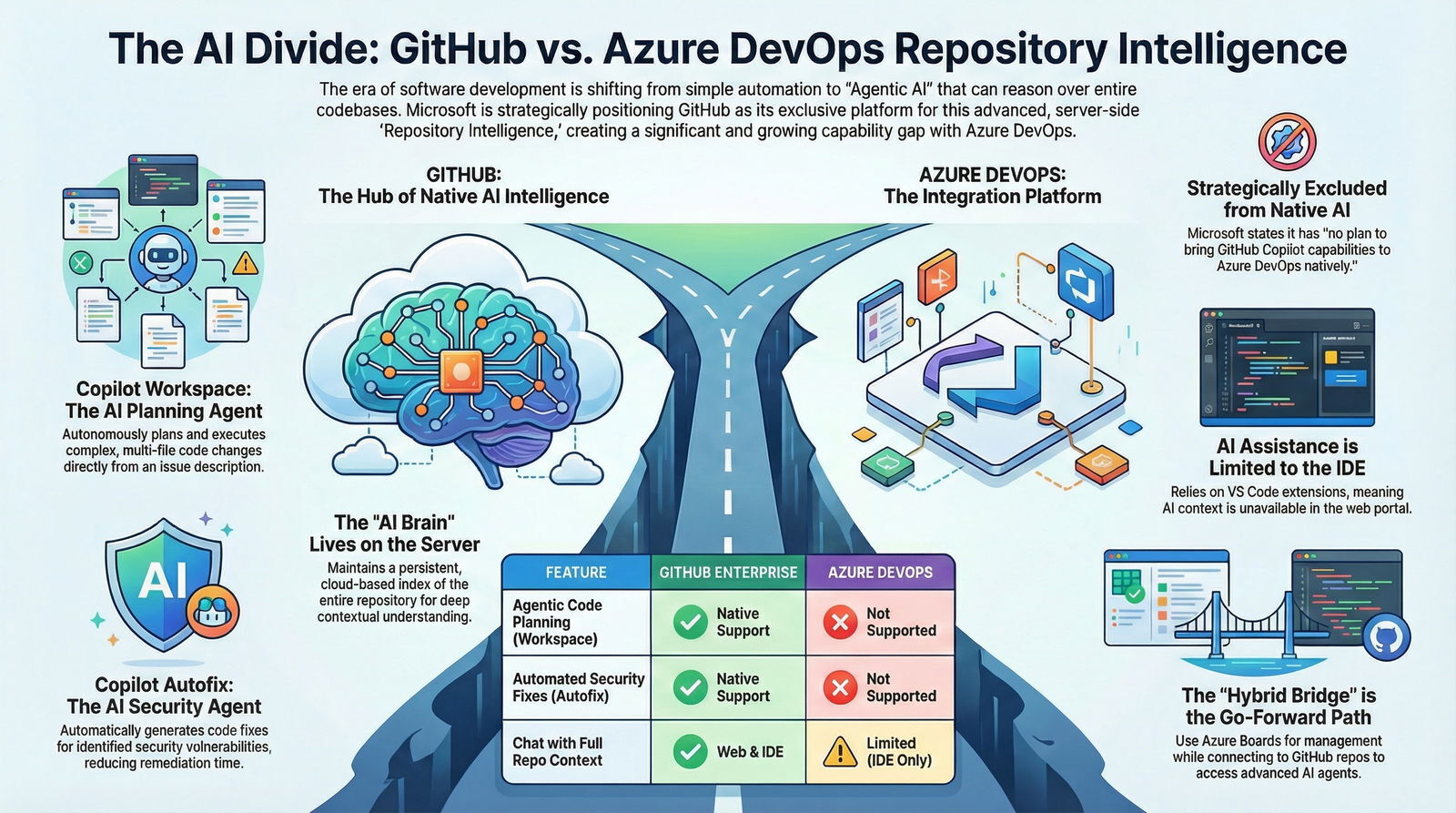
The analysis reveals a deliberate strategic divergence. While Microsoft maintains Azure DevOps as a premier management and orchestration layer, it has positioned GitHub as the exclusive vessel for advanced, server-side repository intelligence. The technologies defining the cutting edge—Copilot Workspace, Copilot Autofix, and GraphRAG—are architected as cloud-native services deeply coupled with the GitHub platform, leaving Azure DevOps to rely on client-side extensions and integrations. This report details the technical underpinnings of this divide, the "Hybrid" bridges being built to span it, and the implications for enterprise architecture strategies through 2026.
1.1 The Strategic Context: Two Platforms, One Owner
Since Microsoft’s acquisition of GitHub in 2018, the industry has watched for signs of consolidation. Instead, Microsoft has pursued a "Better Together" strategy, maintaining parallel roadmaps. Azure DevOps has retained its stronghold in the enterprise sector, prized for its robust board capabilities and deep integration with on-premise Active Directory environments. GitHub, conversely, has served as the innovation engine, pioneering the "AI Pair Programmer" concept with the initial launch of GitHub Copilot.
However, the introduction of "Agentic AI"—systems that can independently plan and execute tasks—has fractured this parallel capability. Agentic AI requires massive, server-side compute resources to maintain up-to-date vector indexes and knowledge graphs of a codebase. GitHub, with its unified cloud architecture, was the natural host for this "AI Brain." Azure DevOps, with its legacy of on-premise server distributions (Azure DevOps Server) and distinct backend architecture, faces significant technical hurdles in hosting similar capabilities natively.
Consequently, the current landscape is characterized by a "Intelligence Gap." While both platforms share the "Copilot" branding, the functionality available to a developer working in an Azure Repo is fundamentally different from that available to a developer in a GitHub repository. Understanding this gap requires looking beyond marketing terms to the underlying mechanics of how AI "reads" a repository.
2. Defining Repository Intelligence: The Technical Architecture
To assess whether Azure DevOps has "similar" capabilities to GitHub, we must first rigorously define what "Repository Intelligence" entails in a modern context. It is a step-change from the "Local Context" model of early AI assistants.
2.1 From Context Windows to Semantic Graphs
First-generation coding assistants operated on a "Finite Context Window." They analyzed the file currently open in the Integrated Development Environment (IDE) and perhaps a limited buffer of adjacent tabs. They were blind to the broader architecture. If a developer asked, "How does the billing service handle retries?", the AI could only answer if the BillingService.cs file was currently open. It possessed no memory of the repository's history or structure.
"Repository Intelligence" solves this by decoupling the AI's context from the user's immediate viewport. It involves three distinct layers of data processing:
- Vector Indexing: The codebase is chunked into snippets, converted into high-dimensional vectors (embeddings), and stored in a vector database. This allows the AI to perform semantic searches—finding code that is conceptually similar to a query, even if the keywords don't match.
- Knowledge Graph Construction: Beyond similarity, the system must understand structure. Technologies like GraphRAG (Graph Retrieval-Augmented Generation) build a directed graph of the code, mapping entities (functions, classes) and relationships (calls, inherits, imports). This allows the AI to traverse the graph to understand impact ("If I change this function, what breaks?").
- Historical Reasoning: The system analyzes the temporal dimension—commit messages, pull request (PR) discussions, and issue descriptions—to understand the intent behind the code.
2.2 The Role of Server-Side Indexing
The crucial differentiator in this architecture is where the index lives.
- Local Indexing (Client-Side): The IDE (e.g., VS Code) scans the files on the developer's disk to build a temporary index. This is resource-intensive, limited by the developer's hardware, and evanescent—it disappears when the session ends.
- Remote Indexing (Server-Side): The platform (GitHub) maintains a persistent, always-up-to-date index in the cloud. When a developer asks a question, the query is sent to the cloud, which retrieves the answer from the full repository context, including files the developer has never downloaded.
This distinction is the fulcrum upon which the comparison between Azure DevOps and GitHub turns. As we will explore, GitHub's intelligence is increasingly server-side and persistent, while Azure DevOps relies heavily on the client-side, ephemeral model.
3. GitHub: The Hub of Native Repository Intelligence
GitHub has aggressively pivoted from being a passive host of code to an active, intelligent participant in the development process. This transformation is driven by a suite of "native" features—meaning they run on GitHub's servers and are integrated into the web interface—that collectively constitute its repository intelligence.
3.1 Copilot Workspace: The Agentic Environment
The most advanced manifestation of repository intelligence is Copilot Workspace. It represents a paradigm shift from "Chat" to "Environment."
In a traditional workflow, a developer reads a GitHub Issue, mentally formulates a plan, finds the relevant files, and begins typing. Copilot Workspace automates the cognitive "pre-work." Upon opening an issue, the Agentic AI scans the repository's server-side index to understand the current state. It then generates a Specification (a natural language description of the problem and solution) and a Plan (a step-by-step list of files to create, modify, or delete).
This capability requires deep reasoning. To propose a valid plan, the AI must understand the dependency graph of the project. It relies on the pre-computed index to know that modifying UserAuth.ts requires a corresponding update to UserTests.ts, even if the user never explicitly mentioned the test file. The developer's role shifts to that of a reviewer: steering the AI by refining the plan before a single line of code is generated. This "task-oriented" environment is exclusive to GitHub and relies entirely on the platform's ability to reason over the repository as a holistic entity.
3.2 Copilot Enterprise: The Knowledge Layer
Copilot Enterprise extends intelligence beyond the IDE and into the browser, enabling "Chat with Your Codebase" directly on GitHub.com. This feature allows stakeholders who may not have a local development environment setup—such as engineering managers or product owners—to query the repository.
Crucially, Copilot Enterprise leverages Knowledge Graph technologies to index not just code, but also documentation and pull request history. It can ingest Markdown files, internal wikis, and discussion threads to form a comprehensive understanding of the project's "tribal knowledge". This allows it to answer qualitative questions like, "What is our established pattern for handling API rate limits?"—a query that requires synthesizing information from both code implementation and written documentation.
3.3 Copilot Autofix: The Security Agent
Perhaps the most quantifiable benefit of repository intelligence is found in Copilot Autofix. When GitHub Advanced Security (GHAS) identifies a vulnerability via CodeQL (static analysis), it does not merely alert the user. The Autofix agent analyzes the data flow leading to the vulnerability and synthesizes a code correction.
The reasoning engine here is sophisticated. It uses a combination of heuristics and LLM inference to generate a fix that is syntactically correct and semantically appropriate for the specific codebase. Data from public betas indicates that this agentic intervention reduces the median time-to-remediation by a factor of three. This capability is intimately tied to the GitHub platform, leveraging the server-side integration of CodeQL results and the repository index to function.
4. Azure DevOps: The Integration Platform
In stark contrast to GitHub's native intelligence, Azure DevOps (ADO) has settled into a role of a robust management platform that integrates with AI rather than embodying it. The analysis of Microsoft’s roadmap and public statements reveals a clear "feature ceiling" for Azure Repos.
4.1 The Strategic Exclusion: No Native "Copilot for Azure Repos"
The most critical finding for Baytech Consulting’s assessment is the explicit confirmation from Microsoft regarding the future of AI in ADO. In roadmap discussions and engineering blogs, Microsoft has stated: "We do not plan to bring GitHub Copilot capabilities to Azure DevOps natively... capabilities like the new coding agent are not coming to Azure DevOps".
This statement is definitive. It means there is no "Copilot Workspace" being built for Azure Repos. There will be no "Chat with Repository" button in the Azure DevOps web portal. The massive server-side indexing and reasoning engines that power GitHub's agents are not being replicated for the Azure DevOps backend. This decision likely stems from the immense engineering complexity of retrofitting such capabilities onto the legacy architecture of Azure DevOps (which shares lineage with the on-premise TFS), compared to the cloud-native, unified architecture of GitHub.
4.2 The Lifeline: VS Code Extensions and Remote Indexing
Azure DevOps users are not entirely devoid of AI assistance, but their access is mediated through the client-side IDE, specifically Visual Studio Code (VS Code).
VS Code supports a feature known as Remote Repository Indexing for Azure DevOps. When a developer opens an Azure Repo in VS Code and authenticates with their Microsoft account, the IDE can trigger a remote index build. This allows the Copilot Chat extension in VS Code to answer questions about the codebase with context that exceeds the currently open files.
However, there are critical limitations to this "extension-based intelligence" compared to GitHub's "native" intelligence:
- Scope of Reasoning: The VS Code extension offers a "Question & Answer" interface (
@workspace), not a "Plan & Execute" environment. It can explain code or suggest snippets, but it cannot autonomously orchestrate the multi-file creation and refactoring workflows seen in Copilot Workspace. - Persistence and Performance: Users report that indexing for non-GitHub repositories can be slower and less reliable. While GitHub indexes are maintained automatically by the server upon every push, Azure DevOps indexes often rely on the IDE to initiate or refresh the context, leading to synchronization lags.
- Visibility: The intelligence is locked inside the developer's IDE. A manager reviewing a PR in the Azure DevOps web portal has no AI assistance—no AI summaries, no AI code review agents, and no "chat" capability. The repository remains a static file store on the web.
4.3 The "Copilot for Azure" Confusion
It is important to clarify a common point of confusion: the "GitHub Copilot for Azure" extension. This tool interacts with the Azure Cloud control plane, not the Azure DevOps repository. It allows developers to ask questions like, "How do I deploy this app to Azure Container Apps?" or "Query my resource groups." It creates a natural language interface for the Azure CLI and Portal. It does not provide intelligence over the source code history stored in Azure Repos. It is an infrastructure tool, not a repository reasoning tool.
4.4 The Security Gap
While GitHub Advanced Security for Azure DevOps (GHAzDO) brings the CodeQL scanning engine to ADO pipelines, it lacks the agentic closure loop. As of 2025, there are no concrete plans to bring Copilot Autofix to Azure DevOps. ADO users receive the security alerts—the diagnosis—but they are denied the AI agent that provides the cure. This illustrates the broader pattern: High-value, compute-intensive AI agents are reserved for data resident on GitHub.
5. The Hybrid Bridge: Connecting Azure Boards to GitHub Agents
Recognizing the massive installed base of Azure DevOps users—including 90% of the Fortune 100 —Microsoft has introduced a "Hybrid" workflow. This strategy creates a bridge that allows Azure Boards (Project Management) to orchestrate AI agents that operate on GitHub repositories. This is the practical answer for organizations that cannot simply abandon Azure DevOps.
5.1 The Architecture of Hybrid Intelligence
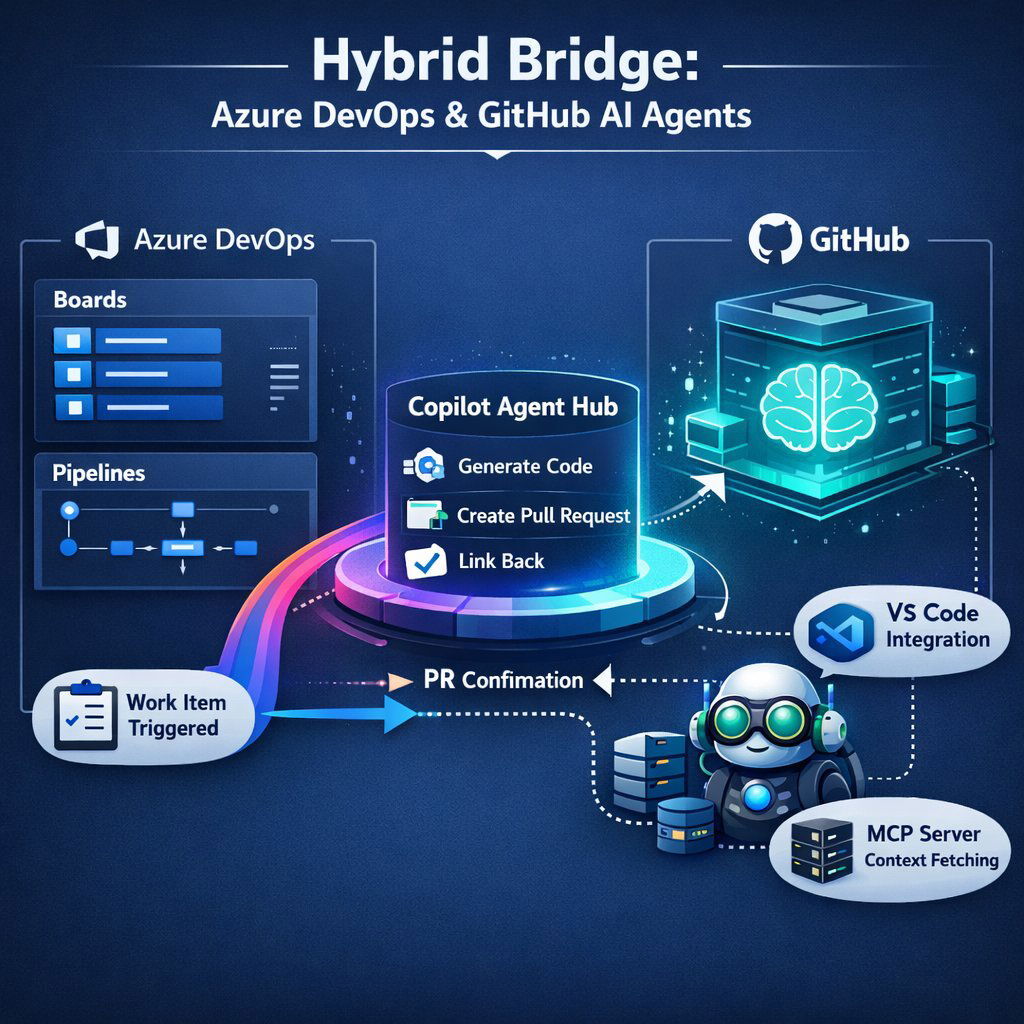
The integration centers on the Azure Boards + GitHub Copilot connection. This feature allows a Work Item in Azure DevOps (e.g., a User Story or Bug) to serve as the trigger for an AI agent living in GitHub.
The Workflow:
- Trigger: A Product Owner or Developer opens a User Story in Azure Boards.
- Action: They select "Create a pull request with GitHub Copilot" directly from the Work Item menu.
- Constraint: The user must select a target repository that is hosted on GitHub. The feature does not support targeting an Azure Repo.
- Execution: The GitHub Copilot Agent reads the description and acceptance criteria from the Azure Board Work Item. It then switches context to the GitHub repository, where it utilizes the server-side index to plan the changes.
- Output: The Agent creates a new branch in the GitHub repo, writes the code, creates a Pull Request, and automatically links that PR back to the Azure Board Work Item for traceability.
This workflow effectively positions Azure DevOps as the "Command and Control" layer, while GitHub serves as the "Execution" layer where the AI actually lives and works.
5.2 The Azure DevOps MCP Server
To further deepen this connection, Microsoft released the Azure DevOps Model Context Protocol (MCP) Server. MCP is an open standard that enables AI models to interact with external tools and data sources.
The ADO MCP Server allows GitHub Copilot (running in VS Code or on GitHub.com) to "reach back" into Azure DevOps to fetch context. For example, a developer in VS Code can ask Copilot: "Summarize the acceptance criteria for my active bugs in ADO and generate test cases for them in this GitHub repo."
Key Insight: The directionality of this integration is telling. The AI resides in the GitHub/Client ecosystem and queries ADO as a passive data source. The intelligence is not in ADO; ADO is merely feeding the intelligence hosted elsewhere.
6. Comparative Analysis: Feature by Feature
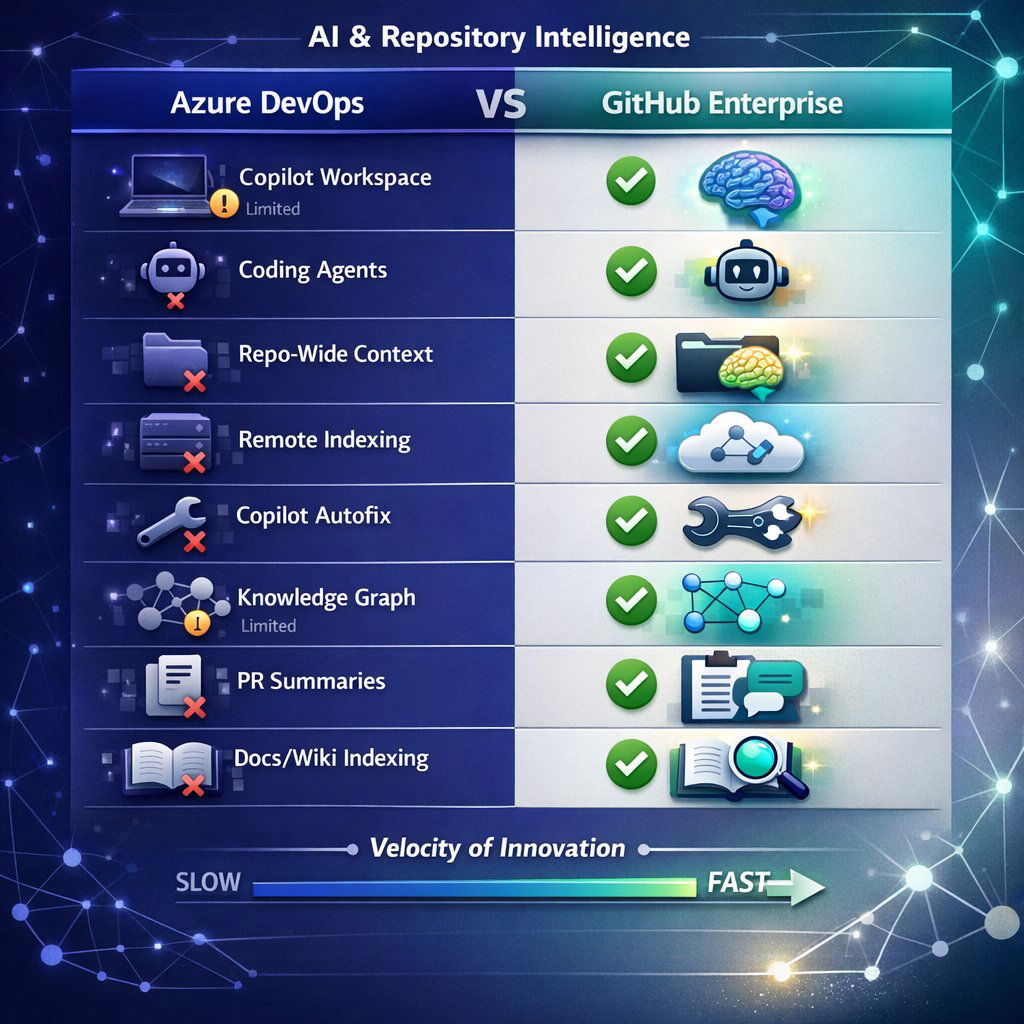
To provide Baytech Consulting with a clear framework for client advisory, we have compiled a detailed comparison of the repository intelligence capabilities. This table contrasts the native capabilities of Azure Repos with those of GitHub Enterprise.
| Feature | Azure DevOps (Azure Repos) | GitHub Enterprise | Insight & Differentiator |
|---|---|---|---|
| Copilot Workspace | ❌ No Support | ✅ Native Support | ADO has no environment for "task-oriented" planning. GitHub Workspace creates specs and plans multi-file changes natively. |
| Coding Agents (Auto-PR) | ❌ No Support | ✅ Native Support | ADO cannot assign an issue to an agent to autonomously create a PR. This requires the repo to be on GitHub. |
| Repo-Wide Context (Chat) | ⚠️ Limited (IDE Only) | ✅ Full (Web & IDE) | ADO context is available via @workspace in VS Code (using remote index), but lacks the persistent, server-side "Chat with Repo" on the web. |
| Remote Indexing | ⚠️ Partial | ✅ Full | VS Code can index ADO repos remotely, but it is often slower or hybrid. GitHub indexes are server-managed and instantly available to all agents. |
| Copilot Autofix | ❌ No Support | ✅ Native Support | ADO has GHAS alerts (CodeQL) but lacks the "Autofix" agent that remediates vulnerabilities automatically. |
| Knowledge Graph (RAG) | ❌ No Support | ✅ Native Support | GitHub's GraphRAG technology enables "reasoning" over entity relationships. ADO relies on standard search/indexing. |
| PR Summaries | ✅ Supported | ✅ Supported | Both platforms support PR summaries, but ADO's implementation is often via extension or limited compared to GitHub's native integration. |
| Docs/Wiki Indexing | ❌ No Support | ✅ Native Support | Copilot Enterprise can index Markdown docs/wikis to answer questions. ADO Copilot cannot typically reason over ADO Wikis. |
6.1 The "Velocity of Innovation" Disparity
Beyond the current feature set, the velocity of innovation serves as a leading indicator for future capabilities. Since 2023, GitHub has released Copilot Chat, Copilot Enterprise, Copilot Workspace, and Copilot Autofix in rapid succession. In the same period, Azure DevOps has primarily released "integration" updates—features designed to better connect ADO to GitHub.
This disparity confirms that Microsoft’s R&D investment in Generative AI is overwhelmingly concentrated on the GitHub platform. Azure DevOps is being maintained as a stable, enterprise-focused platform, but it is not the locus of AI innovation. For clients, this means the gap in capability will widen, not narrow, over time.
7. Migration Considerations and Future Strategy
For Baytech Consulting's clients, the technical reality dictates a strategic response. The decision to migrate is no longer just about "modernization" but about access to a new class of labor: the AI Agent.
7.1 The Business Case for Migration
The primary driver for moving from Azure Repos to GitHub is the efficiency gain from Agentic AI.
- Reduced Remediation Time: The data on Copilot Autofix—fixing vulnerabilities 3x faster—presents a direct ROI calculation for security teams.
- Developer Productivity: Access to Copilot Workspace allows developers to offload the "boilerplate" phase of coding—creating files, setting up imports, and writing scaffolding—to the AI. This shifts high-cost engineering hours from "typing" to "reviewing".
- Future Proofing: As agents evolve to handle SRE tasks (Site Reliability Engineering) and automated upgrades (e.g., Java/NET app modernization agents ), these agents will likely require the data accessibility and indexing that only GitHub provides.
7.2 The "Soft Migration" Strategy
A "Big Bang" migration is rarely feasible for large enterprises. The "Hybrid" model supported by Microsoft offers a pragmatic path.
- Step 1: Uncouple Boards and Repos. Teams can continue using Azure Boards for sprint planning and Azure Pipelines for deployment.
- Step 2: Migrate Source Code. Move the Git repositories from Azure Repos to GitHub. This is a relatively low-risk operation compared to moving work items or pipelines.
- Step 3: Connect. Use the Azure Boards integration to link the ADO work items to the new GitHub repos.
- Result: The team immediately gains access to Workspace, Autofix, and Agents, while the Project Management Office (PMO) sees no change in their reporting or dashboards.
7.3 Barriers to Entry
Migration is not the right solution for every client immediately.
- Data Residency & Sovereignty: While GitHub Enterprise Cloud now offers data residency in the EU, Australia, and other regions, some clients with strict air-gapped requirements may be using Azure DevOps Server (on-premise). For these clients, cloud-based agents are inaccessible regardless of the platform.
- Pipeline Coupling: In many legacy ADO implementations, build pipelines are tightly coupled to specific Azure Repo paths and permission structures. Refactoring thousands of YAML pipelines to point to GitHub can be a significant undertaking that delays the ROI of migration.
Conclusion

In response to the query: No, Azure DevOps does not have similar 'repository intelligence' capabilities to GitHub.
The divergence is intentional and structural. GitHub has been architected as the home of the "AI Brain"—hosting the server-side vector indexes, knowledge graphs, and agentic environments required for the AI to reason over the entire repository history. Azure DevOps, while receiving client-side integrations via VS Code, lacks the native, server-side infrastructure to support these advanced capabilities.
For Baytech Consulting, the advisory stance should be nuanced but clear:
- For AI-First Clients: Migration of repositories to GitHub is mandatory to unlock the current and future wave of Agentic AI.
- For Stability-First Clients: The "Hybrid" model (ADO for Boards/Pipelines, GitHub for Repos) offers the optimal balance of enterprise governance and AI innovation.
- For Restricted Clients: Clients bound to on-premise ADO Server must accept that they will be limited to "Local Context" AI (autocomplete) and will not benefit from "Repository Intelligence" (agents) in the near term.
About Baytech
At Baytech Consulting, we specialize in guiding businesses through this process, helping you build scalable, efficient, and high-performing software that evolves with your needs. Our MVP first approach helps our clients minimize upfront costs and maximize ROI. Ready to take the next step in your software development journey? Contact us today to learn how we can help you achieve your goals with a phased development approach.
About the Author

Bryan Reynolds is an accomplished technology executive with more than 25 years of experience leading innovation in the software industry. As the CEO and founder of Baytech Consulting, he has built a reputation for delivering custom software solutions that help businesses streamline operations, enhance customer experiences, and drive growth.
Bryan’s expertise spans custom software development, cloud infrastructure, artificial intelligence, and strategic business consulting, making him a trusted advisor and thought leader across a wide range of industries.