
In this article
- Why Internal Tools Lose the Budget Argument
- Converting Friction to Defensible Dollars
- The Honest Objection: When Time Savings Are Illusory
- Shadow Spreadsheets as a Diagnostic Signal
- Errors and Rework: The Bigger Number
- What to Measure and How to Capture It Cheaply
- Phasing a Redesign You Cannot Fully Fund
- Measuring the Result and Knowing What Not to Touch
- Securing the ROI of Custom Software
- About Baytech
- About the Author
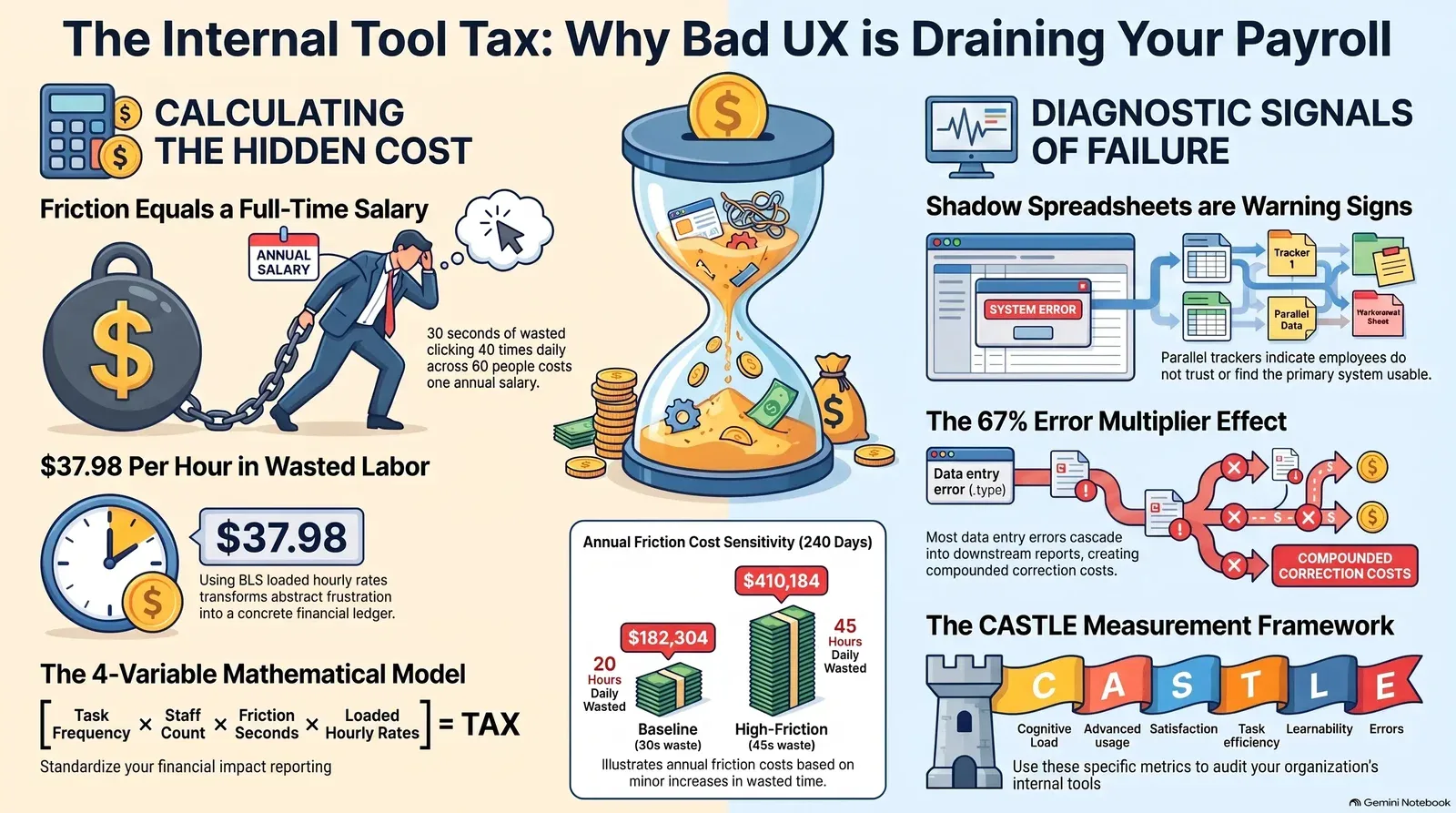
Thirty seconds of unnecessary clicking, forty times a day, across sixty people, equates to roughly one full-time salary a year. The redesign nobody will fund costs less than that.
Customer-facing interfaces consistently secure design budgets because their impact is easy to measure in direct conversion. Internal tools—the claims screen, the order entry form, the dispatch console, the enterprise resource planning (ERP) dashboard—languish with whatever was built a decade ago because nobody has attached a specific financial number to their friction. This article demonstrates how to construct that exact number. You must instrument and measure the time cost of internal workflows, convert that time into loaded salary dollars, and build a redesign business case that a financial officer will actually approve.
Good internal tool UX design requires shifting the argument from qualitative user frustration to quantitative corporate finance. That often means pairing UX insights with a rigorous discovery process so you can capture the real workflows before you start changing anything.
Why Internal Tools Lose the Budget Argument
Internal software systematically receives less design investment than customer-facing software because efficiency losses do not show up on a profit and loss statement as a distinct line item. They hide inside payroll.
When an e-commerce checkout page adds ten seconds of friction, conversion drops, revenue falls, and the analytics dashboard immediately signals an emergency. When an internal dispatch console adds ten seconds of friction to every transaction, the system simply absorbs the inefficiency. Employees type slightly faster, stay slightly later, or invent unofficial workarounds. The operational cost never triggers an alert.
Consequently, internal tools lose budget arguments because the executive proposing the redesign usually brings qualitative complaints to a CFO who demands hard return-on-investment figures. The cost of internal tool friction remains diffuse and unmeasured, while the cost of a software redesign is concrete and immediate. This dynamic leaves the friction unfunded until an analyst converts it into loaded salary hours mapped against a specific, measurable workflow.
Converting Friction to Defensible Dollars
Building a defensible calculation requires strict adherence to actual labor costs rather than base salaries. The U.S. Bureau of Labor Statistics (BLS) Employer Costs for Employee Compensation (ECEC) data reveals that wages typically account for only about 70% of the total cost of an employee, with benefits absorbing the remainder.
For private industry workers as of March 2026, total employer compensation costs averaged $46.60 per hour worked, while specific office and administrative support roles averaged $37.98 per hour. Using a defensible, government-backed hourly rate transforms abstract frustration into a concrete financial ledger.
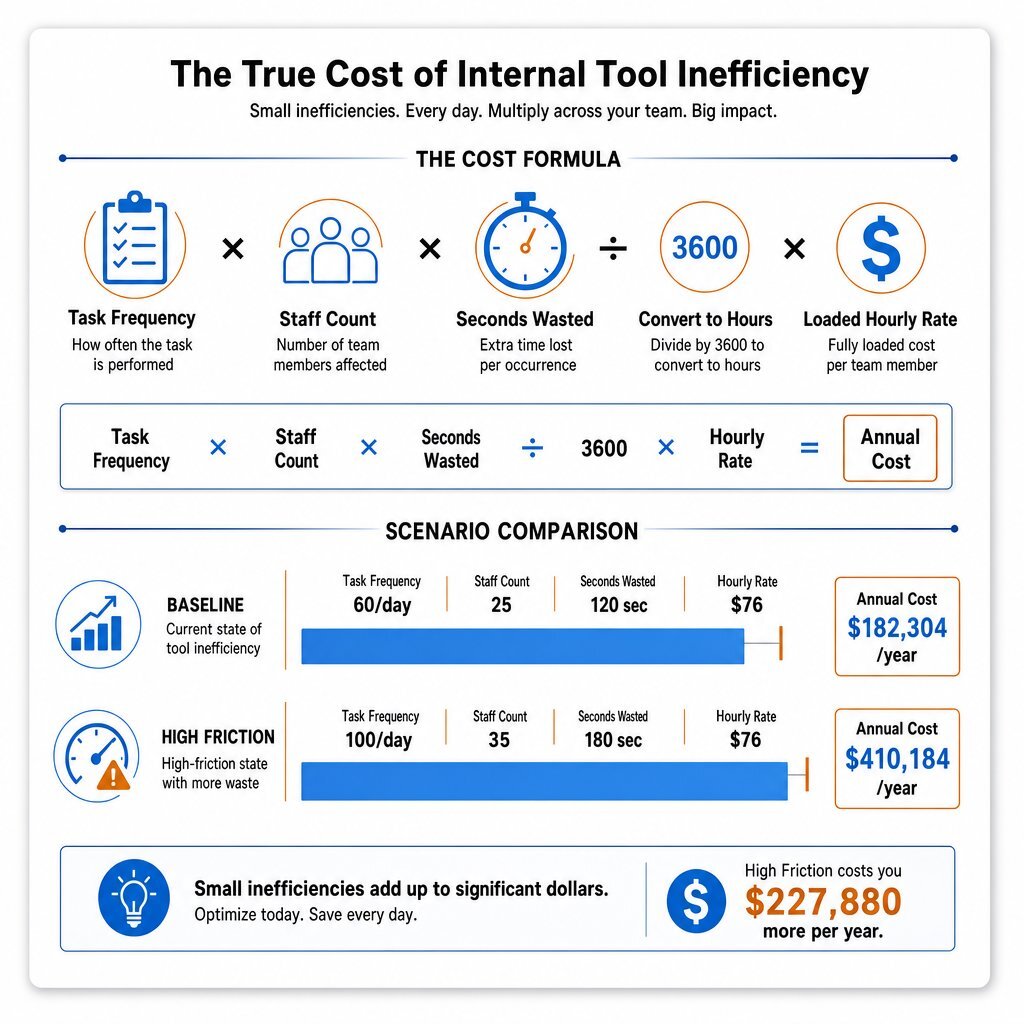
The mathematical model requires only four variables: task frequency, staff count, friction time per task, and the loaded hourly rate.
| Variable | Baseline Scenario | High-Friction Sensitivity Range |
|---|---|---|
| Task Frequency | 40 executions per day | 60 executions per day |
| Staff Count | 60 employees | 60 employees |
| Seconds Wasted (Friction) | 30 seconds per task | 45 seconds per task |
| Loaded Hourly Rate (BLS Office) | $37.98 | $37.98 |
| Daily Hours Wasted | 20 hours | 45 hours |
| Annual Friction Cost (240 days) | $182,304 | $410,184 |
Presenting this arithmetic changes the nature of the budget conversation. It demonstrates that the organization is already spending the redesign budget; it is simply spending it on wasted payroll rather than capitalized software assets. When you later plan how to modernize these tools, patterns like a phased legacy modernization roadmap can help you reduce risk while you rework the UX.
The Honest Objection: When Time Savings Are Illusory
A fatal mistake when building a UX business case is claiming that all aggregated time savings immediately convert into banked cash. A sophisticated financial executive will instantly recognize this as a flawed premise.
Under the Theory of Constraints, aggregated small time savings only convert into real business value under highly specific conditions. If a redesign saves a non-constrained worker twenty minutes a day, the business does not retrieve a fraction of their salary. The worker simply possesses twenty minutes of additional slack time. They do not hand back a portion of their paycheck.
To make the proposal credible, the business case must identify exactly how the recovered time will be utilized. Value is realized only when:
- The savings occur at the operational bottleneck: Removing friction from the system's most constrained resource directly increases total organizational throughput.
- The time is actively reallocated: Staff pivot from administrative data entry to revenue-generating activities, such as proactive client outreach, higher-quality client intake, or strategic planning. For instance, a law firm that streamlines intake can turn saved minutes into more matters opened by automating its revenue-critical workflows.
- The efficiency prevents future hiring: The department can handle projected year-over-year volume growth without increasing headcount.
Acknowledging that some micro-savings will simply improve employee quality of life—rather than directly returning cash to the business—builds immense credibility. It proves you understand how capital actually flows through the organization.
Shadow Spreadsheets as a Diagnostic Signal
The most reliable diagnostic signal of internal workflow failure is the presence of shadow spreadsheets. When staff maintain a parallel record outside the official system—whether it is a budget tracker, a project status list, or a commission calculator—the software's UX has failed in a way that actively bleeds money.
Shadow spreadsheets indicate that employees do not trust the primary system, find it too difficult to update, or cannot extract the visibility they require. This duplication of effort carries an enormous price tag. Industry data reveals that 62% of sales representatives run shadow-accounting spreadsheets to verify their commissions, costing organizations an estimated two to four hours per representative every single week.
Furthermore, shadow systems introduce severe data integrity risks. Research indicates that nearly 90% of spreadsheet documents contain errors, with the error rate jumping to 5% for complex logical tasks. Identifying a shadow workflow provides the perfect target for initial redesign efforts, representing a quantifiable, immediate opportunity to reclaim wasted labor and eliminate risky organizational silos. In many reshored or growing operations, these hidden Excel processes are also a sign that it is time to close the software gap with fit-for-purpose internal applications instead of more spreadsheets.
Errors and Rework: The Bigger Number
Redesign proposals frequently focus entirely on raw time-on-task, completely omitting two larger financial drains: error rework and onboarding burdens.
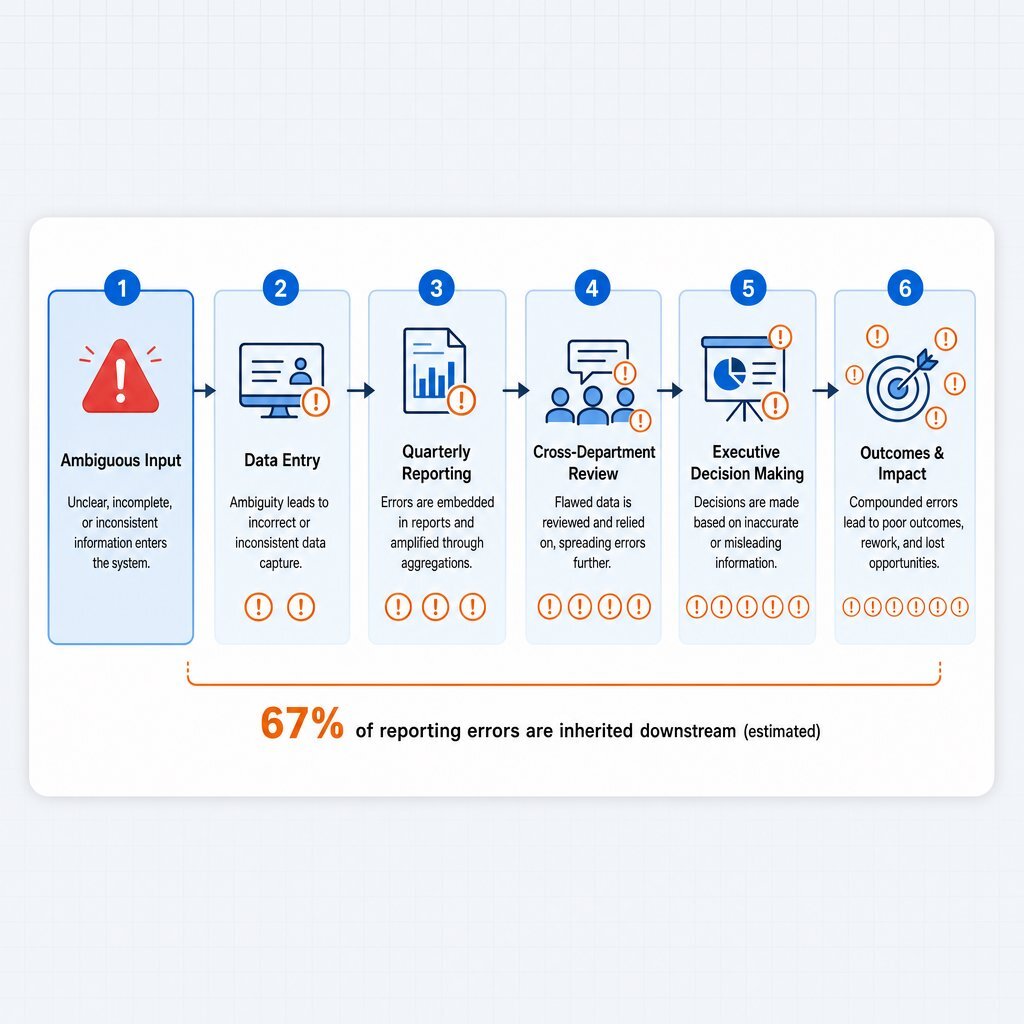
A data entry interface that permits ambiguous formatting or lacks smart defaults generates downstream errors. Fixing a mistake immediately takes seconds. Fixing it after it propagates into a quarterly financial report requires cross-departmental coordination, taking hours or days. Research demonstrates that roughly 67% of reporting errors cascade into other downstream reports, creating a massive multiplier effect on correction costs. A redesign that introduces structural validation and reduces error rates often saves more capital through avoided rework than it does through raw task efficiency.
High-friction internal tools also require extensive, costly training. Ramp-up time—the period required for a new hire to reach full productivity—varies widely but can easily last between 30 and 150 days. During this period, the organization pays full salary for fractional output. A highly usable system slashes this training burden. Intuitive interfaces with clear information architecture mean new employees contribute faster, effectively returning weeks of lost productivity back to the business. That is one reason a deliberate UX design process is not cosmetic; it directly shapes how quickly people can learn and use your tools.
What to Measure and How to Capture It Cheaply
You do not need a massive, expensive instrumentation project to capture diagnostic signals. The necessary data usually exists in adjacent systems, waiting to be aggregated.
| Diagnostic Signal | Capture Method | Effort Required | Actionable Insight |
|---|---|---|---|
| Shadow Tools | Employee interviews and desktop observation. | Low | Reveals missing features or broken trust in the official system. |
| Support Tickets | IT helpdesk categorization (e.g., "password reset", "export failure"). | Low | Highlights severe learnability and navigational issues. |
| Error Rates | Downstream data validation logs and QA rejections. | Medium | Exposes confusing form fields and missing constraints. |
| Time on Task | Moderated usability testing of core workflows. | High | Baselines the current speed limit of the system. |
By assembling these low-effort metrics, you build a composite picture of software friction that is difficult for leadership to ignore. They also give you a starting point for more structured UX-led discovery, instead of jumping straight into development and inviting hidden modernization costs later.
Phasing a Redesign You Cannot Fully Fund
When securing the budget for a comprehensive system replacement is impossible, teams must adopt a phased approach. Strategic redesigns target the specific workflows where high transaction volume intersects with high user friction.
Instead of tearing out an entire legacy platform, modern engineering teams utilize custom application development to overlay task-specific, highly optimized interfaces on top of existing databases. You decouple the user experience from the data storage layer. By fixing the single most expensive data-entry bottleneck first, you prove the ROI of the redesign and generate the internal momentum necessary to fund the next phase of modernization. This overlay strategy is similar to using sidecar apps in healthcare or FHIR facades in EHRs, where organizations keep core systems but add focused tools on top—an approach detailed in guides on sidecar-style modernization.
Measuring the Result and Knowing What Not to Touch
Standard product metrics fail when applied to enterprise software. Google's popular HEART framework tracks adoption and retention—metrics that are completely meaningless when employees are mandated to use a tool to keep their jobs.
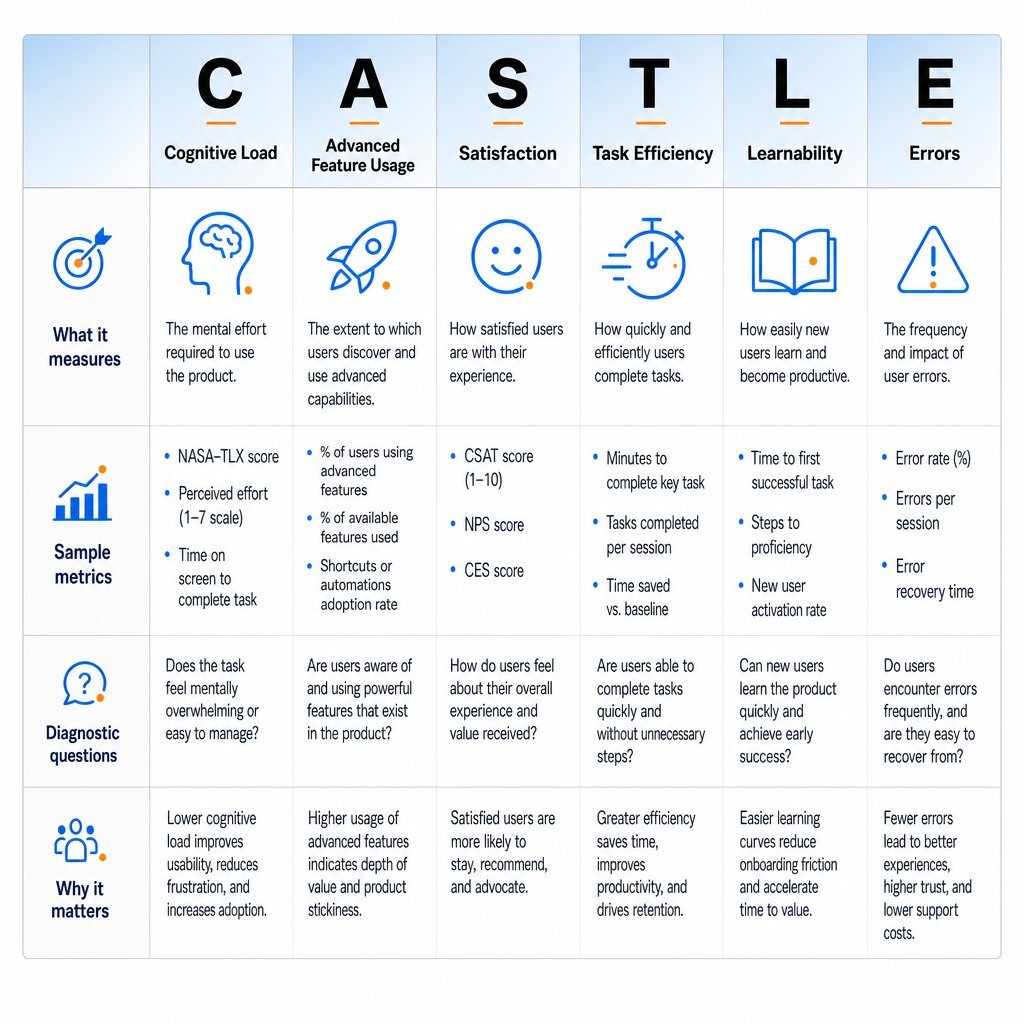
The Nielsen Norman Group developed the CASTLE framework specifically for productivity and workplace applications. It evaluates software across six specialized dimensions designed for mandatory internal environments:
- Cognitive Load: The mental effort required to complete tasks.
- Advanced Feature Usage: How effectively users leverage optional accelerators and shortcuts.
- Satisfaction: Self-reported frustration levels.
- Task Efficiency: The speed and step-count required to complete workflows.
- Learnability: The speed at which new hires reach full proficiency.
- Errors: The frequency of data-quality issues and system-blocking messages.
Tracking these specific dimensions establishes a baseline experience before development begins. This allows you to evaluate the investment honestly after the fact.
Equally important is knowing what to leave alone.
| Workflow Volume | User Friction | Recommendation |
|---|---|---|
| High | High | Priority Redesign: The highest return on invested capital. Immediate workflow overlay required. |
| High | Low | Monitor: The system works. Do not disrupt the current flow for aesthetic updates. |
| Low | High | Retrain or Automate: Low volume does not justify custom UX development. Improve documentation or automate the task. |
| Low | Low | Ignore: Allocate engineering resources elsewhere. |
Internal tools with low volume and low friction should never receive design budget. Focus capital strictly on the high-volume, high-friction bottlenecks that govern organizational throughput. When those bottlenecks sit in mobile workflows or field operations, consider whether a mobile-first architecture or a dedicated mobile application would cut steps further than incremental tweaks to a desktop form.
Securing the ROI of Custom Software
The internal tool UX tax is relentless. It drains operational budgets hour by hour, masked entirely as routine payroll. Addressing it requires leadership to acknowledge that poor usability is not a subjective aesthetic failure; it is a structural financial liability.
By documenting the baseline, mapping the friction, applying loaded labor rates, and targeting the operational bottlenecks, organizations build a redesign case that survives financial scrutiny. Firms specializing in custom software development and application management, such as Baytech Consulting, routinely leverage Rapid Agile Deployment to tackle these exact enterprise inefficiencies. Utilizing a Tailored Tech Advantage ensures that internal software evolves from a daily friction point into a streamlined engine of operational throughput. Paired with the right agile delivery approach, these focused UX investments can keep improving over time instead of becoming the next generation of stuck, hard-to-use tools.
Frequently Asked Questions
What is the most reliable sign that an internal tool needs a UX redesign?
The appearance of shadow spreadsheets is the strongest indicator of internal tool failure. When employees maintain parallel tracking systems or personal databases to bypass official software, the system is actively causing operational friction, duplicating effort, and introducing severe data integrity risks. In many organizations, these shadows sit on top of outdated ERP or CRM interfaces that really need a more modern self-service and workflow experience to keep pace with how people expect to work.
Supporting Links
- CASTLE Framework for Productivity/Workplace Applications
- Employer Costs for Employee Compensation - March 2026
Shadow Accounting in Sales: Why 62% of Reps Verify Their Own Commissions
About Baytech
At Baytech Consulting, we specialize in guiding businesses through this process, helping you build scalable, efficient, and high-performing software that evolves with your needs. Our MVP first approach helps our clients minimize upfront costs and maximize ROI. Ready to take the next step in your software development journey? Contact us today to learn how we can help you achieve your goals with a phased development approach.
About the Author

Bryan Reynolds is an accomplished technology executive with more than 25 years of experience leading innovation in the software industry. As the CEO and founder of Baytech Consulting, he has built a reputation for delivering custom software solutions that help businesses streamline operations, enhance customer experiences, and drive growth.
Bryan’s expertise spans custom software development, cloud infrastructure, artificial intelligence, and strategic business consulting, making him a trusted advisor and thought leader across a wide range of industries.