
Quit Wasting Mobile Users: A Radical Playbook for B2B Apps
July 06, 2026 / Bryan Reynolds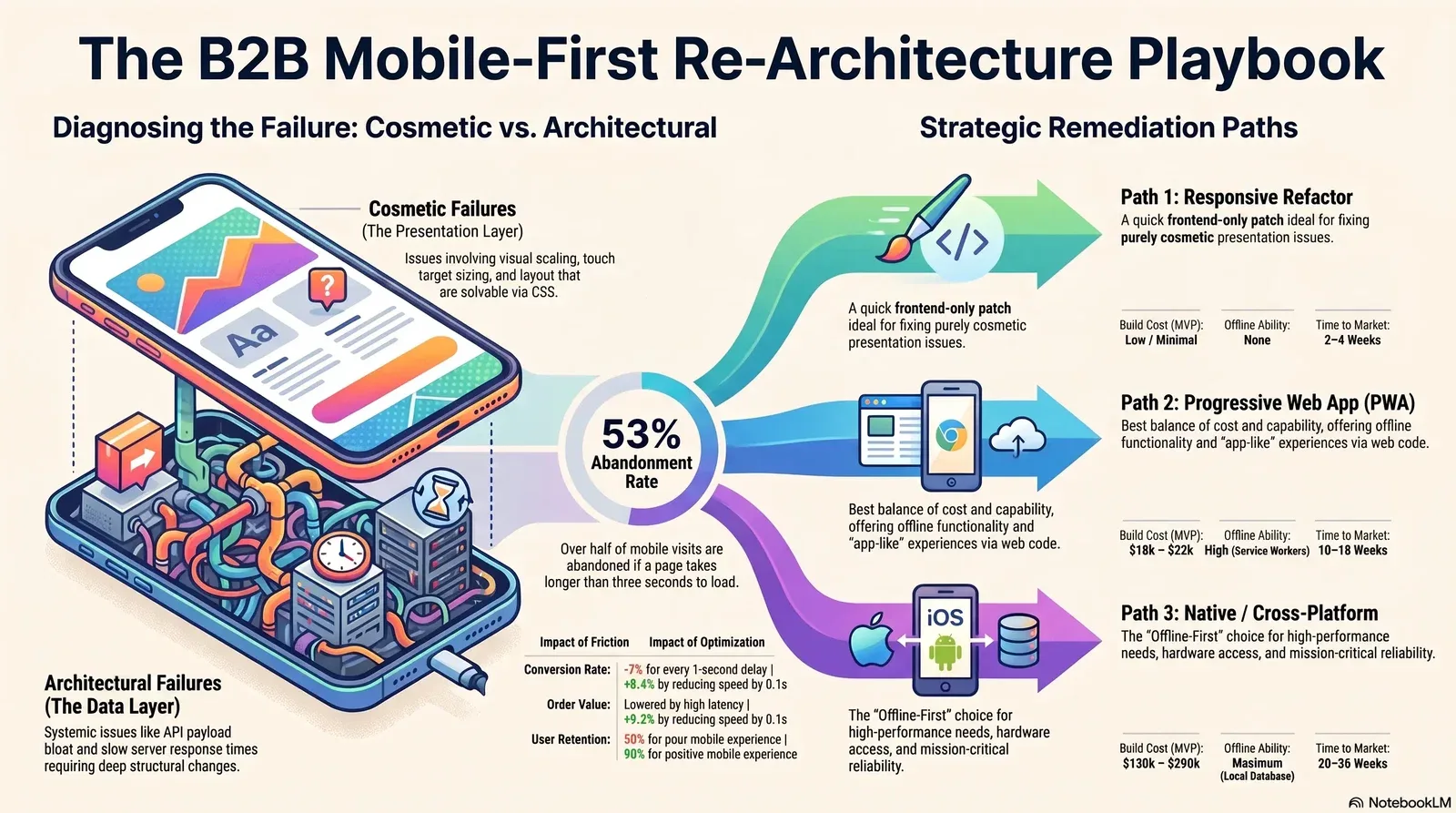
Mobile-First Isn't Optional: A Re-Architecture Playbook for B2B Apps Losing Users on Phones
When half of a platform's users open a business-to-business (B2B) application on a smartphone, and half of those individuals abandon the session before completing their intended task, the organization faces a critical revenue hemorrhage. This severe attrition is rarely the result of a minor design flaw or a missing color hex code. Rather, it represents realized capital walking out through a viewport the engineering team never properly architected for.
Software development teams operating in the B2B sector frequently treat mobile accessibility as a desktop afterthought. By applying superficial, reactive styling to highly complex enterprise applications, these organizations watch their engagement metrics and conversion rates crater on the exact devices where a rapidly growing segment of their user base actually operates. This comprehensive analysis provides technology executives, financial officers, and marketing directors with a definitive playbook. The following framework details how to accurately diagnose whether a mobile user experience problem is merely cosmetic or fundamentally architectural. The report subsequently outlines the strategic modernization paths available—a responsive CSS patch, a Progressive Web App (PWA), or a comprehensive native re-architecture—allowing decision-makers to accurately scope the necessary remediation, project the associated financial expenditures, and effectively phase the implementation.
The Quiet Cost of Desktop-First Design
The long-held assumption that complex B2B workflows only occur on widescreen desktop monitors is a dangerous artifact of legacy enterprise thinking. The proliferation of powerful mobile hardware and high-speed cellular networks has fundamentally altered the physical context of enterprise work. As of the current period, mobile devices account for approximately 62.5% of all global internet traffic, fundamentally eclipsing desktop usage.
While consumer-facing applications adapted to this reality years ago, the enterprise software sector has lagged, operating under the mistaken belief that B2B buyers, supply chain managers, and field deployment teams would patiently wait to return to their desks to complete digital tasks. The empirical data clearly invalidates this assumption.
The Scale of B2B Mobile Adoption
The global mobile user base reached an estimated 7.49 billion individuals by the start of 2025, cementing the smartphone as the primary conduit for human-computer interaction.
Within the B2B sector specifically, this ubiquitous connectivity has catalyzed a permanent shift in procurement behaviors and workflow executions. Approximately 30% of the digital population—equating to 1.65 billion people—now conducts commercial shopping and procurement activities directly via mobile phones.
The structural makeup of the enterprise buying committee has also evolved, growing to an average of 11.2 independent stakeholders for deals exceeding $50,000.
These stakeholders no longer evaluate vendors in coordinated boardroom settings. They are frequently researching software vendors, reviewing technical specifications, and approving financial invoices while in transit, between meetings, or operating on factory floors. Research indicates that optimized mobile usage actually accelerates the B2B time to purchase by up to 20%, largely by facilitating faster decision-making and enhanced team collaboration during these complex, multi-stakeholder procurement cycles. The buyer journey has become overwhelmingly self-directed, with 67% of B2B buyers stating they prefer a rep-free, digital-first experience. If the digital experience provided on a mobile device is fragmented, the entire procurement cycle stalls.
The Financial Penalty of Mobile Friction
When a B2B application is built with a desktop-first mentality, the resulting mobile experience typically features agonizingly slow load times, bloated data payloads, and clunky, non-intuitive navigation. This technological friction translates directly and immediately into lost sales pipeline. Performance optimization separates the enterprise applications that drive business outcomes from those that simply collect dust on employee devices.
A mere one-second delay in page load time can reduce conversion rates by up to 7%. In a B2B context, where the average enterprise software purchase cycle stretches to a grueling 218 days, maintaining momentum is absolutely critical.
Users demonstrate zero tolerance for latency. A delay in response time forces B2B buyers to abandon sessions entirely, seeking out competitors who offer consumer-grade mobile experiences. Consider that 53% of mobile site visits are abandoned if a page requires more than three seconds to load.
On mobile devices, conversion rates generally hover around 1.4% to 3.0%, depending on the specific industry vertical, which is typically half the rate seen on traditional desktop platforms. In the B2B Technology sector, the average conversion rate sits at 2.64%, while B2B Manufacturing and Wholesale hover between 1.9% and 2.6%.
Conversely, when organizations invest in delivering a superior mobile experience, the financial rewards are disproportionate. Data indicates that 90% of B2B buyers who report a positive mobile experience are highly likely to purchase from the same vendor again, compared to only 50% of buyers subjected to a poor mobile experience.
For an enterprise vendor generating $2 billion in annual revenue, resolving mobile friction can drive an estimated 30 million to 60 million in bottom-line impact through higher customer retention, improved lead qualification, and faster cycle times. Furthermore, performance enhancements yield immediate transactional uplifts; reducing site speed by just 0.1 seconds has been shown to increase average order values by 9.2% and total mobile conversions by 8.4%.
Diagnosing the Friction: Cosmetic Versus Architectural Mobile Failures
Before an engineering team can effectively remediate a broken mobile experience, executive decision-makers must accurately diagnose the root cause of the failure. Misdiagnosing a fundamental architectural problem as a mere cosmetic issue leads to endless cycles of superficial patching. This misallocation of resources wastes expensive developer hours while user engagement continues to quietly bleed out.
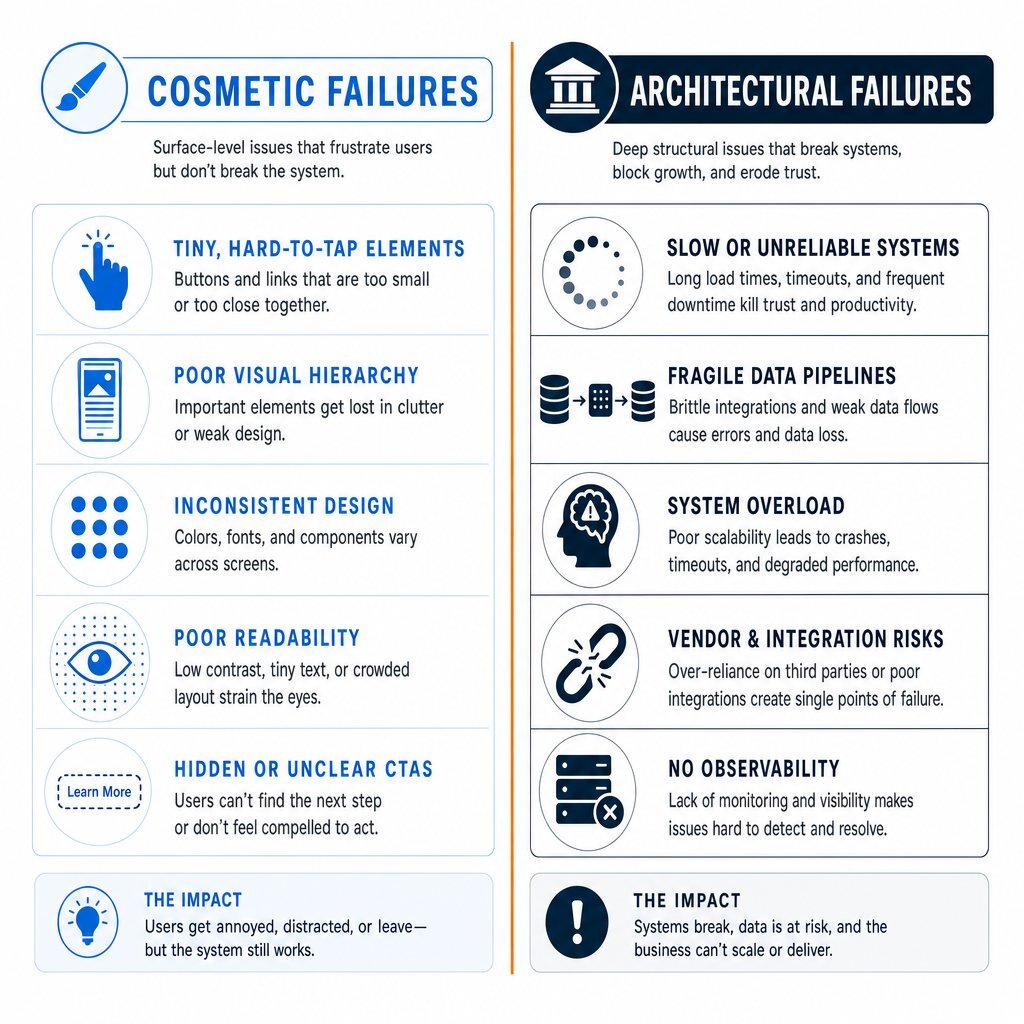
Recognizing Cosmetic Failures
Cosmetic failures occur when the underlying server architecture, data pipelines, and application logic are fundamentally sound, but the presentation layer fails to gracefully adapt to the constrained dimensions of a mobile screen. These issues are typically resolved entirely within the frontend codebase utilizing CSS media queries, flexible grid systems, and responsive web design methodologies. Teams that already follow an Agile methodology can often prioritize and ship these fixes quickly, without touching deeper systems.
The symptoms of cosmetic failures are highly visible to the end-user:
Content Dispersion: When a mobile-first design is stretched to a desktop screen without proper scaling logic, or conversely, when a desktop design shrinks uniformly to a mobile screen, the content becomes either overly dispersed or impossibly dense. This phenomenon requires the user to engage in excessive scrolling and pinch-to-zoom actions just to locate critical information like quote forms or contact numbers.
Touch Target Sizing: Buttons, hyperlinks, and form input fields are rendered too small or clustered too closely together for a human finger to accurately select them without accidental misclicks.
Hidden Primary Actions: Critical conversion elements, such as "Request Demo" buttons, checkout carts, or "Submit Approval" triggers, are pushed far below the initial viewport. When primary actions disappear below the fold on a mobile device, users rarely scroll to find them, leading to immediate task abandonment.
Variant Grid Collapse: Complex B2B products often feature massive data grids for selecting variations, sizes, or technical specifications. On a desktop, a 50-cell matrix is manageable. On a smartphone, this matrix becomes unusable, requiring an interface redesign into step-by-step dropdown selectors.
A cosmetic problem implies that the application's Time to First Byte (TTFB) is rapid, the database queries are efficient, and the server transfers only the necessary data. The application simply looks incorrect. A targeted responsive CSS patch can effectively remedy these surface-level presentation flaws, especially when paired with thoughtful UX design that prioritizes clarity on small screens.
Recognizing Architectural Failures
Architectural failures are vastly more destructive to the user experience and significantly more expensive to resolve. These systemic issues occur when the fundamental way the application requests, processes, stores, and syncs data is inherently incompatible with the constraints of mobile cellular networks and mobile hardware processing capabilities. Applying CSS styling fixes to an architectural failure is equivalent to applying fresh paint to a vehicle with a destroyed transmission.
The symptoms of architectural failures manifest in deep performance degradation:
API Payload Bloat: This represents a classic desktop-first error. A desktop interface might display a massive data table featuring hundreds of rows and dozens of columns. If the mobile interface is redesigned to only display the ten most recent items, but the backend REST API still transmits the entire massive dataset over a 4G or 5G cellular network, the application suffers from severe payload bloat. The mobile device is forced to download, parse, and hold megabytes of unnecessary data in memory, instantly degrading the physical performance of the device and draining the battery.
High Time to First Byte (TTFB): The mobile application takes an agonizing amount of time to display any initial content. This is rarely a styling issue; it indicates that the server is struggling with inefficient database queries, poor cloud hosting infrastructure, or a complete lack of server-side caching.
Render-Blocking Asset Delivery: Desktop applications often rely on massive, unminified JavaScript bundles and excessive third-party tracking scripts. When delivered to a mobile browser, these assets block the rendering engine, forcing the user to stare at a blank white screen while the device's processor struggles to parse the heavy code. Furthermore, a lack of server-level compression technologies, such as GZIP or Brotli, results in unnecessarily large file transfers.
State Loss on Disconnection: B2B users are frequently on the move. If a field technician or traveling executive loses cellular service for five seconds while submitting a complex inspection form, and the application crashes or permanently loses all inputted data, the architecture completely lacks offline resilience.
When the diagnostic symptoms point clearly toward architectural flaws—specifically regarding payload delivery, database querying, and offline fragility—patching the user interface will not stop the user hemorrhage. The organization must evaluate deeper structural remediation paths and often needs to rethink its enterprise application architecture end to end.
The Three Remediation Paths Explained
When a B2B application requires systemic mobile modernization, engineering leadership generally evaluates three distinct technological paths. Each path offers a vastly different balance of technical capability, financial cost, and time-to-market execution.
Path 1: The Responsive Refactor (The Patch)
A responsive refactor involves maintaining the existing single codebase, current backend architecture, and database structure while comprehensively overhauling the frontend presentation layer. Engineers utilize fluid grids, flexible imagery, and advanced CSS media queries to ensure the application scales and reflows seamlessly across various device viewports.
This approach is highly effective if the preliminary diagnostic phase determined that the application's issues are purely cosmetic in nature. It requires minimal backend alteration and can be deployed rapidly. Development teams can utilize modern CSS frameworks and established design systems to standardize touch targets, implement collapsible mobile navigation menus, and optimize image delivery formats based on device resolution and orientation.
However, the severe limitation of the responsive refactor is that it fundamentally does not address data delivery or architectural bloat. If the backend is built as a monolithic architecture that tightly couples the relational database to the desktop view, a responsive refactor simply hides the excess data utilizing CSS rules (display: none) rather than preventing its transmission from the server. The application will visually appear optimized, but it will still consume excessive cellular bandwidth and device memory, leading to persistent, sluggish performance on mobile processors.
Path 2: The Progressive Web App (PWA)
A Progressive Web App (PWA) represents a significant evolutionary leap beyond a simple responsive website. PWAs utilize modern web platform capabilities and specialized browser APIs to deliver a user experience that closely mimics a platform-specific, native installed application, all executed from a single, unified web codebase.
The defining technical characteristic of a Progressive Web App is the implementation of a "Service Worker." A service worker is a specialized, event-driven JavaScript asset that acts as a programmatic proxy server sitting directly between the web application, the user's browser, and the external network.
Operating on a separate background thread distinct from the main user interface, the service worker enables transformative architectural capabilities for complex B2B applications:
Robust Offline Functionality: Service workers can utilize the browser's Cache API to persistently store application shells, HTML, CSS, JavaScript routing files, and specific data responses. If a B2B user drops into an area without network coverage, the service worker intercepts the outbound network request and serves the cached interface instantly, allowing the user to continue interacting with the application without encountering a generic browser error page.
Background Synchronization: The Background Synchronization API allows a web application to gracefully defer tasks until the user regains a stable internet connection. For example, if a field sales representative submits an order creation form while entirely offline, the application registers a sync request via the
SyncManagerinterface. Once the device's operating system detects that connectivity is restored, the browser quietly wakes the service worker in the background, and the stored order is seamlessly transmitted to the server without requiring the user to manually reopen the application.Web Push Notifications: Utilizing the Push API, PWAs can alert users to critical, time-sensitive events (such as an urgent invoice approval requiring immediate signature) even when the browser application is completely closed, effectively mirroring the vital engagement mechanics of traditional native applications.
Frictionless Installability: PWAs bypass the traditional app store distribution model. Users can install the application directly to their device's home screen via a browser prompt. Once installed, the PWA operates in a standalone, immersive window without the standard browser chrome (URL bar, navigation buttons), providing a highly focused workspace.
PWAs deliver exceptional performance, bypass cumbersome app store approval bottlenecks, and significantly reduce API payload bloat when paired with a modernized backend. Because they rely on standard web infrastructure and are inherently indexable by search engines, they offer highly cost-efficient scaling and superior top-of-funnel discoverability compared to native applications.
Path 3: Native and Cross-Platform Re-Architecture
When a B2B application requires uncompromising computational performance, complex offline data manipulation, or deep, unrestricted integration with the physical hardware of the mobile device, a full native or cross-platform re-architecture becomes the only viable technical path.
This path demands significant engineering investment and treats the mobile experience as a distinct, primary product channel.
Native Development: This approach involves writing completely separate applications specifically tailored for the iOS and Android operating systems using platform-specific, compiled languages (Swift or Objective-C for Apple environments; Kotlin or Java for Android environments). Native apps provide the absolute highest tier of performance because they compile directly down to machine code and possess unfettered, direct access to the device's Graphics Processing Unit (GPU), advanced biometric sensors, and proprietary operating system features.
Cross-Platform Development: Modern frameworks such as React Native and Flutter allow engineering teams to write a single, unified codebase that subsequently compiles into near-native applications for both the iOS and Android ecosystems simultaneously. This approach significantly reduces initial development costs and time-to-market execution compared to pure dual-native builds, while still offering substantially more hardware integration and rendering speed than a web-based PWA.
The most profound architectural advantage of pursuing a native or cross-platform build is the ability to construct a true Offline-First Architecture. In demanding B2B contexts—such as field service management, remote facility inspections, or complex supply chain logistics—continuous cellular connectivity is impossible to guarantee. An offline-first native application operates on the fundamental principle that the local device database is the primary, authoritative source of truth.
In this sophisticated architecture, every user action—creating records, updating files, or deleting entries—is processed instantly against a local database layer utilizing technologies like SQLite, Realm, or WatermelonDB. Because the application does not wait for a server response, the user interface remains flawlessly responsive. The application relies on a dedicated background Sync Engine to eventually maintain alignment between the local device database and the remote centralized server. Every write to the local store is appended to an outbound mutation queue. When network connectivity becomes available, the sync engine drains this queue, utilizing deterministic conflict resolution strategies (such as strict timestamp validation or complex Conflict-Free Replicated Data Types) to securely resolve discrepancies when multiple offline users alter the exact same database record simultaneously.
While this path requires the highest upfront capital investment and introduces the ongoing operational friction of app store deployments and rigid review guidelines, it delivers unparalleled reliability for mission-critical enterprise workflows. For field-heavy use cases like field service operations, this additional resilience often pays for itself in avoided downtime and fewer failed visits.
Side-by-Side Trade-Offs: Cost, Timeline, Capability, and Maintenance
Choosing between a responsive patch, a PWA, and a native or cross-platform build requires a rigorous, data-driven evaluation of the associated trade-offs. The financial modeling and operational implications of each path vary dramatically and will heavily influence the Total Cost of Ownership (TCO).
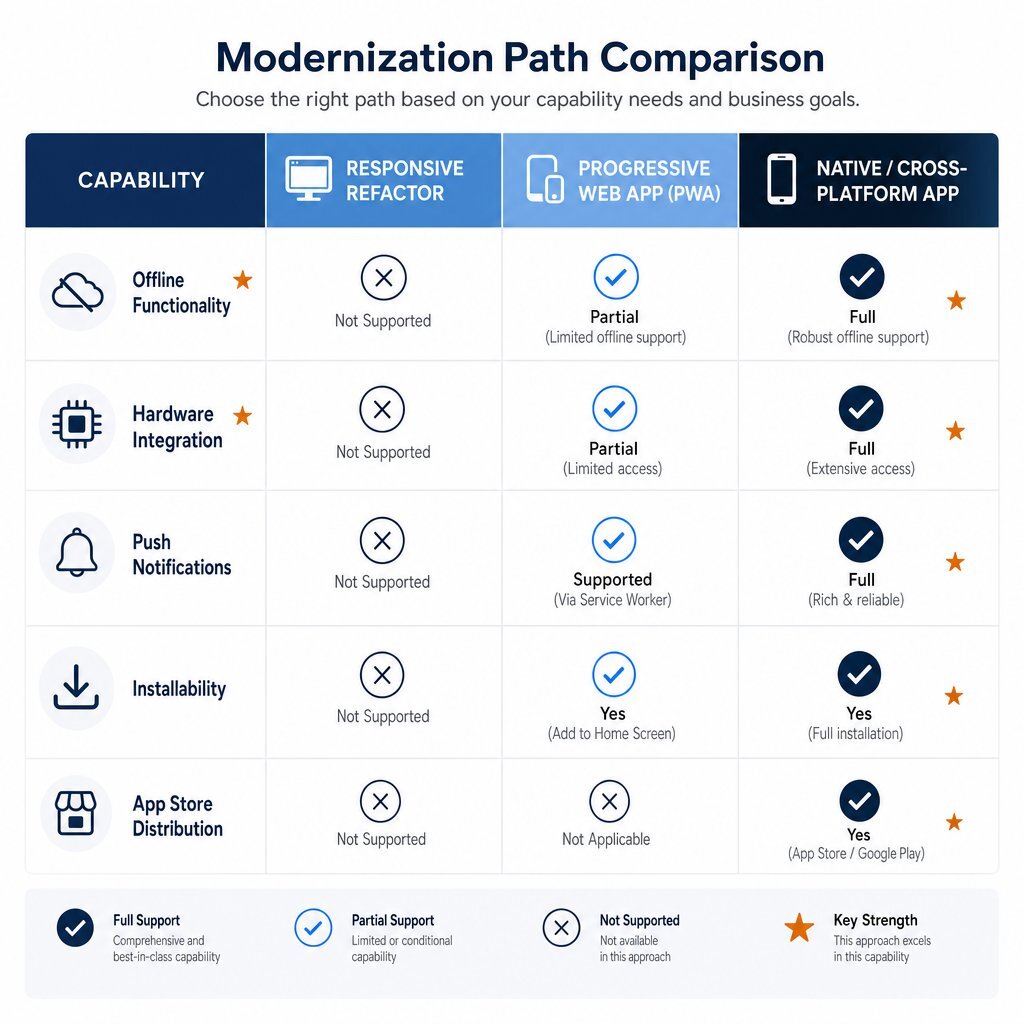
Capability and Hardware Integration Comparison
The technical capabilities of each specific approach dictate exactly what features the B2B application can ultimately offer to its user base.
| Feature / Capability Focus | Responsive Web App | Progressive Web App (PWA) | Native / Cross-Platform App |
|---|---|---|---|
| Offline Functionality | None. Application fails immediately without an active network connection. | High. Capable of caching assets via Service Workers and utilizing Background Sync. | Maximum. True local databases (SQLite) and complex bidirectional Sync Engines. |
| Device Hardware Access | Severely limited to basic browser permissions. | Moderate. Access to basic camera, geolocation, and clipboard. | Full. Unrestricted access to GPU acceleration, advanced sensors, and direct printing APIs. |
| Push Notifications | Browser-dependent. Often unreliable on mobile devices. | Strong on Android devices; recently supported but technically complex on iOS. | Excellent. Deep OS integration ensuring high reliability and delivery rates. |
| Installability and Presence | Bookmarks only. Operates exclusively within a browser tab. | "Add to Home Screen" prompt; operates in a standalone, app-like window. | Downloaded and installed via the Apple App Store or Google Play Store. |
| App Store Distribution | None. Indexed organically by search engines. | Generally not required, though can be wrapped for specific store inclusion. | Required. Subject to Apple and Google review processes and potential delays. |
Timeline and Implementation Metrics
Implementation timelines vary significantly based on the inherent complexity of the foundational architecture. A cosmetic responsive patch might take a dedicated team of frontend engineers a few weeks to deploy. Full systemic re-architectures stretch into multiple quarters.
Industry research indicates that deploying a Minimum Viable Product (MVP) for a complex software build typically requires between 8 to 16 weeks, with executive founders consistently underestimating this timeline by a factor of two or three. While modern AI-assisted coding tools (such as GitHub Copilot or Cursor) can accelerate the pure development phase by up to 40%, they do not condense the necessary time required for architectural discovery, intricate UI/UX design, or rigorous quality assurance testing.
| Implementation Phase | PWA Timeline Estimation | Cross-Platform Timeline Estimation | Native (Dual OS) Timeline Estimation |
|---|---|---|---|
| Discovery & Architecture | 2 - 3 Weeks | 3 - 4 Weeks | 4 - 6 Weeks |
| Core Development (MVP) | 8 - 14 Weeks | 12 - 18 Weeks | 16 - 28 Weeks |
| Deployment & App Store Review | Instantaneous (Standard Web Deploy) | 1 - 2 Weeks (Store Review Cycles) | 1 - 2 Weeks (Store Review Cycles) |
Financial Trade-Offs: Build Cost and Total Cost of Ownership
The financial commitment for enterprise software extends far beyond the initial development phase. Decision-makers must meticulously calculate the Total Cost of Ownership (TCO), which includes ongoing maintenance, secure cloud hosting, and required platform fees over the entire software lifecycle.
Initial build costs scale exponentially with complexity. By prioritizing a web-first PWA, organizations can often launch their product 30% to 50% faster than native mobile applications, fundamentally lowering the initial capital expenditure required to test market fit. Conversely, pure native development requires maintaining highly specialized engineering talent across two completely distinct programming languages, driving operational costs significantly higher.
| Financial Cost Category | PWA (Progressive Web App) | Cross-Platform (Flutter/React Native) | Native (iOS + Android Codebases) |
|---|---|---|---|
| Initial Build Cost (MVP) | 18,000 – 32,000 | 50,000 – 120,000 | 130,000 – 290,000 (Combined Total) |
| 12-Month Run Rate (100k MAU) | 2,500 – 5,000 | 4,000 – 10,000 (Plus Store Fees) | 5,500 – 14,000 (Plus Store Fees) |
| Maintenance Burden | Low (Single web codebase to update and monitor) | Medium (Single codebase, but requires managing platform-specific edge-cases) | High (Two completely distinct codebases to simultaneously maintain) |
| Platform Revenue Share | 0% | Up to 30% on digital goods | Up to 30% on digital goods |
Note: B2B SaaS platforms that handle corporate billing entirely outside of the application stores can often bypass the 30% Apple and Google fee structure. However, applications that rely on in-app purchases, micro-transactions, or digital subscriptions must rigorously model this ongoing expense.
Choosing a Path: A Decision Framework Tied to Workflow Centrality
The selection of a mobile modernization path must be governed strictly by business requirements and workflow analysis, not by technological novelty or engineering preference. The optimal choice depends entirely on how central the mobile device is to the user's core daily workflow and precisely where the existing digital friction points live.
When to Execute a Responsive Refactor
A responsive patch remains the correct strategic choice when data analytics reveal that mobile users are primarily consuming information rather than executing complex, multi-step workflows. If the B2B application serves primarily as a high-level reporting dashboard for executives, a content repository for downloading technical whitepapers, or a basic lead-generation marketing portal, rebuilding the entire underlying architecture is an inefficient use of corporate capital.
Organizations should deliberately choose this path if the application's Time to First Byte is already under acceptable thresholds, the API payloads are properly paginated, and the sole complaints from the user base revolve around pinch-to-zoom frustrations and unreadable text. Executing a responsive refactor quickly stabilizes the user experience while safely conserving engineering resources for deeper backend modernizations elsewhere in the business.
When to Build a Progressive Web App (PWA)
The Progressive Web App represents the optimal convergence of technical capability and cost-efficiency for the vast majority of modern B2B SaaS products. This path is ideal when the application requires robust transactional capabilities, complex form submissions, and basic offline resilience, but does not necessitate deep, low-level integration with the physical hardware of the user's mobile device.
If the core B2B users are sales teams needing to swiftly update Customer Relationship Management (CRM) records between client meetings, or procurement officers approving massive purchase orders while commuting, a PWA delivers the requisite speed and background synchronization without the crippling overhead of app store maintenance. The inherent "write once, run everywhere" nature of PWAs ensures that all users across all devices benefit from real-time software updates instantly. This completely bypasses the operational friction of forcing users to manually download application updates from an app store, ensuring that the entire workforce is always utilizing the most secure and feature-rich version of the software.
Furthermore, because PWAs are seamlessly indexed by search engines, they are vastly superior for top-of-funnel discovery and marketing acquisition compared to native applications that are hidden behind opaque app store search algorithms. For organizations looking to stop overpaying for generic tools and build their own differentiated experiences, a PWA can also be the first step toward a broader AI-powered personalization strategy grounded in first-party data.
When to Commit to a Native or Cross-Platform Re-Architecture
A full re-architecture to a native or cross-platform application is financially and operationally justified exclusively when the application's core value proposition relies on technological capabilities the web browser simply cannot provide.
This rigorous path is practically mandatory for B2B applications operating in highly physical sectors like healthcare technology, industrial logistics, or heavy manufacturing. If field technicians operating in remote geographic locations with zero cellular coverage must access extensive technical schematics, manipulate massive local datasets continuously, and utilize the device's camera for precise augmented reality measurements, standard web technologies will inevitably fail. Only a true offline-first architecture equipped with localized SQLite databases and a deterministic conflict-resolution sync engine can handle this massive payload securely and reliably without data corruption.
Additionally, enterprise applications requiring rigorous, enterprise-grade security controls—such as financial compliance software that must inherently prevent unauthorized screen recording or interface directly with encrypted biometric hardware—require the deep, operating-system-level security privileges granted exclusively to native applications.
Phasing the Work: Shipping Value Without a Big-Bang Rebuild
Attempting a "big-bang" software rebuild—where the entire legacy application is halted, dismantled, and completely rewritten over a multi-year period—carries a staggering rate of commercial failure. Software modernization must be executed iteratively. Phasing the architectural work reduces technical risk, provides early indicators of Return on Investment (ROI), and ensures the engineering team is continuously building features that users actually require rather than features the team assumes they want.
Step 1: The Critical Discovery Phase
Successful application re-architecture does not begin with writing a single line of code; it begins with the formal Discovery Phase. This preliminary period of intense business analysis, user workflow research, and architectural mapping is fundamentally designed to manage and mitigate structural risk.
During a rigorous discovery process, technology leaders engage in "Strategic Pushback," challenging legacy assumptions about what specific features are genuinely necessary for the mobile Minimum Viable Product (MVP). Skipping this vital phase results in unmanaged, catastrophic scope creep, which acts as the primary destroyer of software project timelines. Data illustrates that every unplanned feature added mid-build extends the delivery schedule by an average of one to two full weeks.
A structured Discovery Phase clarifies the overarching product strategy, explicitly documents technical constraints, and establishes a highly accurate financial roadmap. Without it, ongoing development costs remain dangerously opaque, and the final product risks failing to meet the actual workflow requirements of the B2B user. In practical financial terms, the Discovery Phase typically consumes about 10% of the initial project budget, representing a highly efficient risk-mitigation investment that routinely prevents massive budget overruns during the backend coding phases. For a deeper dive into how this works in practice, see Baytech’s guidance on why the discovery phase saves your software project and budget.
Step 2: Decoupling and API-First Design
If the legacy application is currently structured as a monolith—where the backend logic, relational database, and frontend HTML presentation are tightly woven together—the first necessary technical maneuver is to decouple the distinct systems. Engineering teams must firmly adopt an API-first design principle before building new mobile interfaces.
By building a robust, distinct Application Programming Interface (API) layer—utilizing strict RESTful principles combined with GZip compression, or transitioning to GraphQL to allow mobile clients to request only the precise data they need—the backend logic becomes a single, authoritative source of truth. Modern containerized infrastructure, leveraging technologies such as Docker and Kubernetes, and robust databases like PostgreSQL, allows this backend to scale elastically.
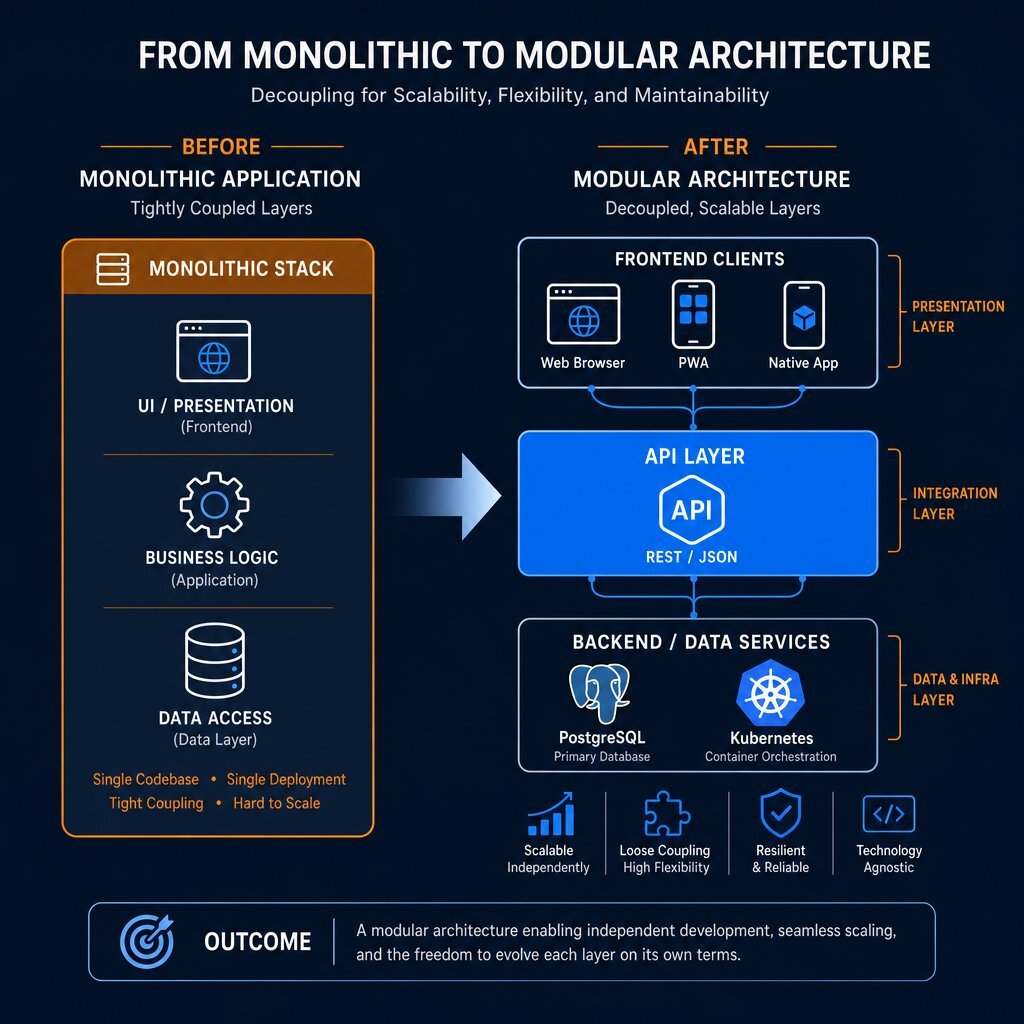
Once this clean API layer is established, the organization can confidently build a lightweight PWA or a native mobile interface that communicates cleanly with the server. This vital decoupling prevents the dangerous duplication of business logic across different devices and ensures that any future changes to the core database do not inadvertently break the mobile user interface. This represents the core philosophy of a composable architecture, allowing the business to retain its strategic flexibility. It also sets the stage for future initiatives like an API-driven portability-first AI strategy that keeps you from being locked into a single vendor stack.
Step 3: Measuring ROI and Defining Success
Before a single line of new mobile code is deployed to production, organizations must establish a strict baseline of current analytics. To definitively prove to the Chief Financial Officer that the investment in mobile re-architecture paid off, leaders must track specific, actionable behavioral and financial Key Performance Indicators (KPIs):
- Time to First Byte (TTFB) and Page Load: Track the exact reduction in milliseconds required to load core application workflows over standard cellular networks.
Drop-off Rates in Key Journeys: Identify exactly where mobile users currently abandon the application. An effective re-architecture should demonstrate a drastic, measurable reduction in abandonment at crucial data-entry forms and checkout interfaces.
MQL to SQL Conversion on Mobile: Monitor whether the volume of Marketing Qualified Leads successfully transitioning to Sales Qualified Leads improves when the mobile experience is modernized.
Average Order Value (AOV): Studies consistently show that improving mobile site speed by mere fractions of a second correlates directly with higher average order values and an increase in total pages viewed per session.
By launching a highly targeted MVP—such as a PWA dedicated solely to the application's most critical workflow—organizations can capture these metrics early. If the localized PWA successfully reduces system latency and demonstrably increases task completion rates, the executive team secures the empirical data required to fund the modernization of the remaining legacy application footprint. These same metrics also help you understand where AI-assisted development is truly improving delivery speed versus just generating more code.
Conclusion
The transition toward mobile functionality in the B2B sector is no longer an optional, consumer-centric enhancement; it is a fundamental requirement for maintaining operational efficiency and securing enterprise revenue. When B2B applications fail to adapt to the reality of mobile procurement and remote workflows, organizations experience a quiet but severe bleed in pipeline conversion and user retention.
By applying a rigorous diagnostic framework, technology leaders can accurately distinguish between superficial cosmetic flaws and deep-seated architectural failures. Armed with this understanding, organizations can strategically select the most efficient modernization path—whether that is a rapid responsive refactor, the deployment of a highly capable Progressive Web App, or a comprehensive offline-first native re-architecture. Through the execution of a disciplined Discovery Phase, the adoption of API-first decoupling, and a commitment to iterative deployment, B2B enterprises can successfully transform their failing mobile experiences into powerful catalysts for operational growth and competitive differentiation.
For organizations preparing to undertake this critical digital modernization, partnering with a specialized engineering firm ensures architectural integrity and cost-efficiency. Baytech Consulting specializes in guiding businesses through complex software project rescue and modernization, leveraging a Tailored Tech Advantage to craft robust, API-driven solutions utilizing proven enterprise stacks, including Azure DevOps On-Prem, PostgreSQL, and Kubernetes. By prioritizing an MVP-first approach and Rapid Agile Deployment, Baytech Consulting empowers organizations to minimize upfront capital risk while maximizing long-term Return on Investment.
Frequently Asked Question
Can a Progressive Web App (PWA) truly function without an active internet connection? Yes, Progressive Web Apps provide robust offline capabilities by utilizing Service Workers and the Cache API to persistently store essential application files and data locally on the device. While operating offline, users can interact with this cached data and seamlessly queue new actions (such as complex form submissions) that the Background Sync API will automatically transmit to the remote server the moment cellular or Wi-Fi network connectivity is restored.
Supporting Links
- https://www.baytechconsulting.com/blog/why-your-website-fails-on-mobile-and-how-to-fix-it
- https://www.baytechconsulting.com/blog/mobile-app-development-services-2025
About Baytech
At Baytech Consulting, we specialize in guiding businesses through this process, helping you build scalable, efficient, and high-performing software that evolves with your needs. Our MVP first approach helps our clients minimize upfront costs and maximize ROI. Ready to take the next step in your software development journey? Contact us today to learn how we can help you achieve your goals with a phased development approach.
About the Author

Bryan Reynolds is an accomplished technology executive with more than 25 years of experience leading innovation in the software industry. As the CEO and founder of Baytech Consulting, he has built a reputation for delivering custom software solutions that help businesses streamline operations, enhance customer experiences, and drive growth.
Bryan’s expertise spans custom software development, cloud infrastructure, artificial intelligence, and strategic business consulting, making him a trusted advisor and thought leader across a wide range of industries.