
In this article
- What Exactly Is Google Opal? (And, More Importantly, What It's Not)
- Who Should Be Using Google Opal Within My Organization?
- How Does It Work? A Look Under the Hood for the Non-Developer
- How Much Will Google Opal Cost My Business?
- The Competitive Landscape: How Does Opal Compare?
- Is No-Code AI Ready for the Enterprise?
- AI in Google Opal: What’s Different
- Conclusion: Baytech’s Recommendation: A Strategic Framework for No-Code AI
- Further Reading
- About Baytech
- About the Author
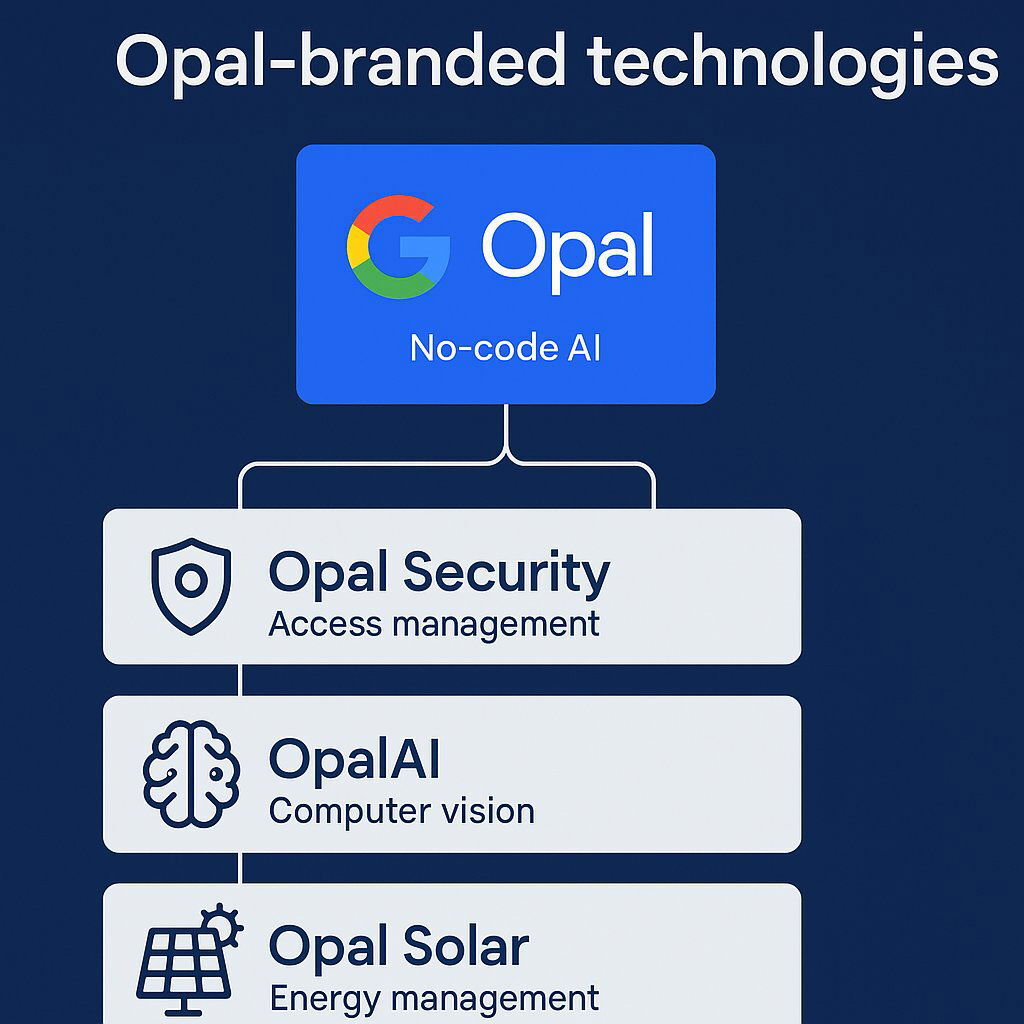
Opal isn’t just one tool—several tech products share the name. Know the difference.
A new front has opened in the battle for technological supremacy, and it’s not happening in a data center or a research lab. It’s happening in your marketing department, your sales team, and your operations floor. A trend, sometimes called “vibe-coding,” has emerged, promising to transform anyone with an idea into an application developer using simple, natural language. This isn’t a niche curiosity; it’s a strategic imperative for tech titans like Google, Amazon, and Microsoft, who are racing to define the future of software creation.
Into this fray steps Google Opal, the company’s latest and most accessible entry into the world of no-code AI development. The new opal is an improved version of Google's no-code AI platform, featuring recent updates, expanded capabilities, and broader availability to make AI mini-app creation easier and more reliable for users worldwide. It promises to let your team build AI-powered mini-applications with nothing more than a text prompt. The potential for rapid innovation and productivity gains is immense. But with great power comes great risk.
As your strategic technology advisors, Baytech Consulting has prepared this executive briefing to cut through the hype. We will answer the fundamental questions you should be asking before your organization takes its first step into this new world. This report provides a clear-eyed analysis of what Google Opal is, who it’s for, what it will likely cost, and, most critically, the profound risks and strategic considerations of embracing no-code AI in the enterprise.
What Exactly Is Google Opal? (And, More Importantly, What It's Not)
At its core, Google Opal is an experimental, no-code AI application builder from the company’s innovation incubator, Google Labs. Currently available as a public beta exclusively in the United States, its central premise is to allow users to build, edit, and share small, focused “mini-AI apps” (also referred to as 'ai mini' applications—no-code, easily shareable AI mini-apps) using natural language instructions and a visual workflow editor. The entire experience is designed for simplicity and accessibility, targeting users who have no traditional programming skills.
Tackling the "Opal" Brand Confusion
Before we begin, it’s important to address a major point of market confusion. The name “Opal” is used by several distinct and unrelated technology products, and differentiating them is the first step in a clear analysis. When your teams mention “Opal,” they could be referring to any of the following:
- Google Opal: The subject of this report—an experimental, no-code AI app builder from Google Labs.
- Opal Security: An established enterprise platform for managing employee access, permissions, and authorization to critical business applications, often used for compliance standards like SOX and SOC-2.
- OpalAI: A specialized technology company that provides advanced AI and computer vision services for specific industries, including property technology (PropTech), transportation infrastructure management, and wildfire detection.
- Welocalize OPAL: An AI-enabled service delivery platform from the company Welocalize, focused on enterprise-scale content localization, translation, and transcreation.
- Opal.so: A popular consumer-facing mobile and desktop application designed to help individuals manage screen time, block distracting apps, and improve focus and mental well-being.
- Optimizely Opal: A suite of agentic AI capabilities embedded within the Optimizely Digital Experience Platform (DXP), designed to automate complex marketing tasks like content creation, SEO research, and campaign analysis.
For the remainder of this report, “Opal” will refer exclusively to the experimental AI app builder from Google.
The Technology Explained for Executives
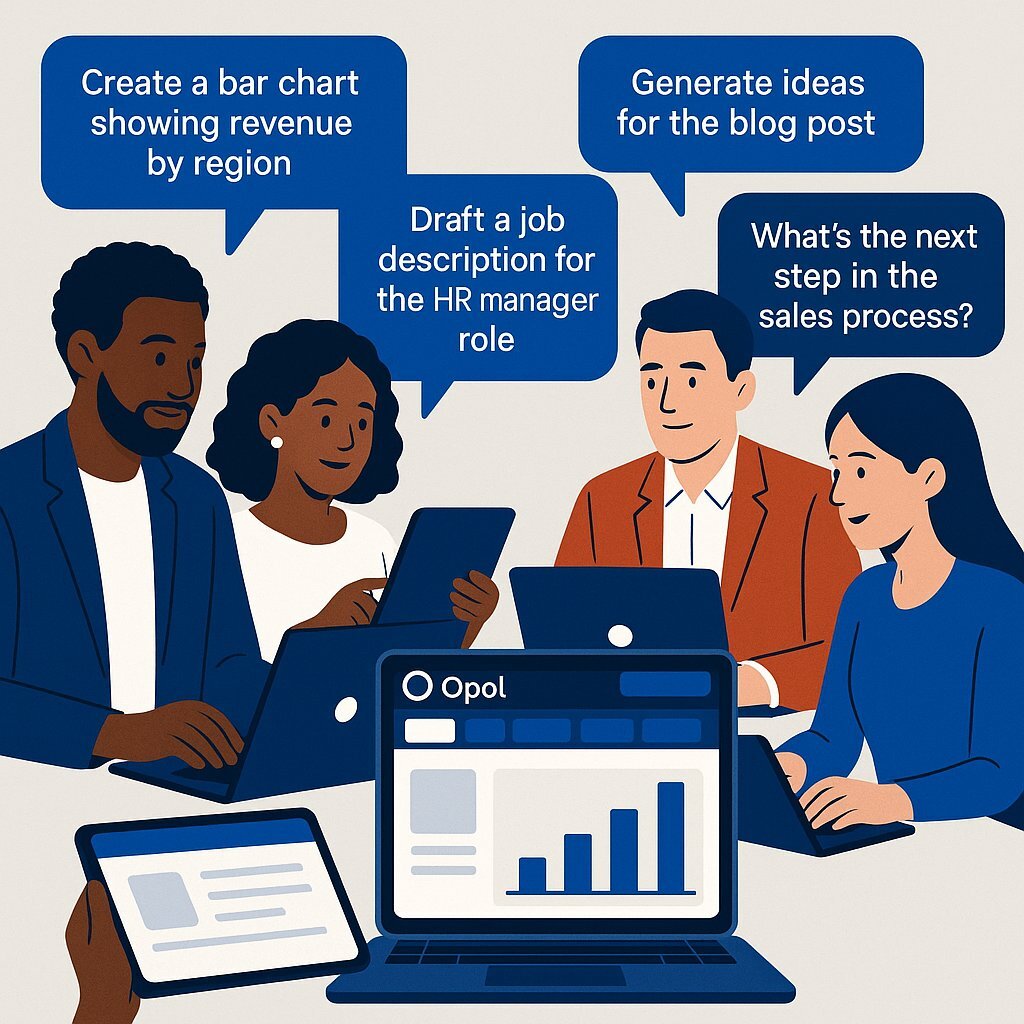
Opal lets subject-matter experts—not just IT—with natural language AI development.
In business terms, Opal is a translator. It takes a user’s high-level intent, expressed in plain English, and converts it into a functional application. For example, a user might prompt, “Create an app that takes a customer support ticket and drafts a polite reply.” The mini-app is created directly from the user’s prompt, making the process seamless. Opal then creates a visual, multi-step workflow. This is a diagram of connected nodes, where each node represents a distinct step in the process: an input field for the ticket, a call to an AI model (like Google’s Gemini) to generate the text, and an output field to display the final draft. Opal builds these workflows using natural language instructions and a visual editor, so users can customize and visualize their applications without coding. This abstracts away all the underlying technical complexity. The user doesn’t need to know how to select an AI model, manage API keys, handle data formats or write a single line of code.
The decision by Google to brand Opal as an “experiment” from “Google Labs” is a key strategic signal for any business leader. This is not just a disclaimer about potential bugs. It’s a deliberate positioning that allows Google to achieve several goals simultaneously. First, it lowers the barrier to entry in the hyper-competitive “vibe-coding” market, so they can release quickly to gauge public interest without the rigorous stability and support requirements of a full-fledged Google Cloud product like Vertex AI. Second, it allows Google to collect enormous amounts of valuable data on how non-developers approach AI application creation, which will inform the future of their more mature platforms.
For an executive, this “experimental” status means one thing: risk. The platform will be volatile, with features appearing, changing or disappearing with little notice. There are no enterprise-grade Service Level Agreements (SLAs), no dedicated support channels and no guarantees of long-term availability. So Opal should be viewed as a free research and development opportunity—a tool for exploration and learning—but absolutely not a stable platform to build business critical processes upon.
Who Should Be Using Google Opal Within My Organization?
Google Opal is designed to democratize AI development, pushing the power of creation beyond the IT department and into the hands of subject-matter experts across the enterprise. Its target audience is the non-technical professional: the marketer, the salesperson, the HR coordinator, the business analyst and the “citizen developer” who understands a business problem intimately but lacks the coding skills to solve it.
The platform’s primary value is in its speed and iteration, so it’s ideal for a specific set of business activities.
Primary Use Cases for Business
- Rapid Prototyping & Proofs of Concept (PoCs): This is probably Opal’s most valuable enterprise use case. A team can take an idea for an AI-driven feature and build a functional, interactive prototype in minutes or hours, not weeks or months. These prototypes are often referred to as "ai mini apps"—user-friendly, no-code tools that enable rapid creation, visualization and sharing of AI-powered applications for practical business needs. This working model can then be shown to stakeholders to get buy-in and funding for a full-scale development project, reducing the risk and cost of innovation. This approach aligns closely with the “vibe coding” trend analyzed in Rapid Prototyping & MVPs: The Enterprise Guide to Smarter Innovation, which explores rapid prototyping and the shift from AI-assisted to AI-native software design.
- Custom Internal Productivity Tools: Departments can build their own “mini-apps” to automate domain-specific tasks. These ai mini apps are no-code or low-code so they’re accessible and easy to use for employees without technical backgrounds. This enables employees to solve their own problems without adding to the IT backlog. For example a marketing team could create an app that generates social media post variations from a single product description or a sales team could build a tool that drafts personalized follow-up emails based on meeting notes.
- Fostering Bottom-Up Innovation: By putting an AI tool in the hands of employees across the organization, Opal can act as a catalyst for experimentation. Subject-matter experts can explore AI-powered solutions for their unique challenges, leading to novel applications that a central IT team might never think of.
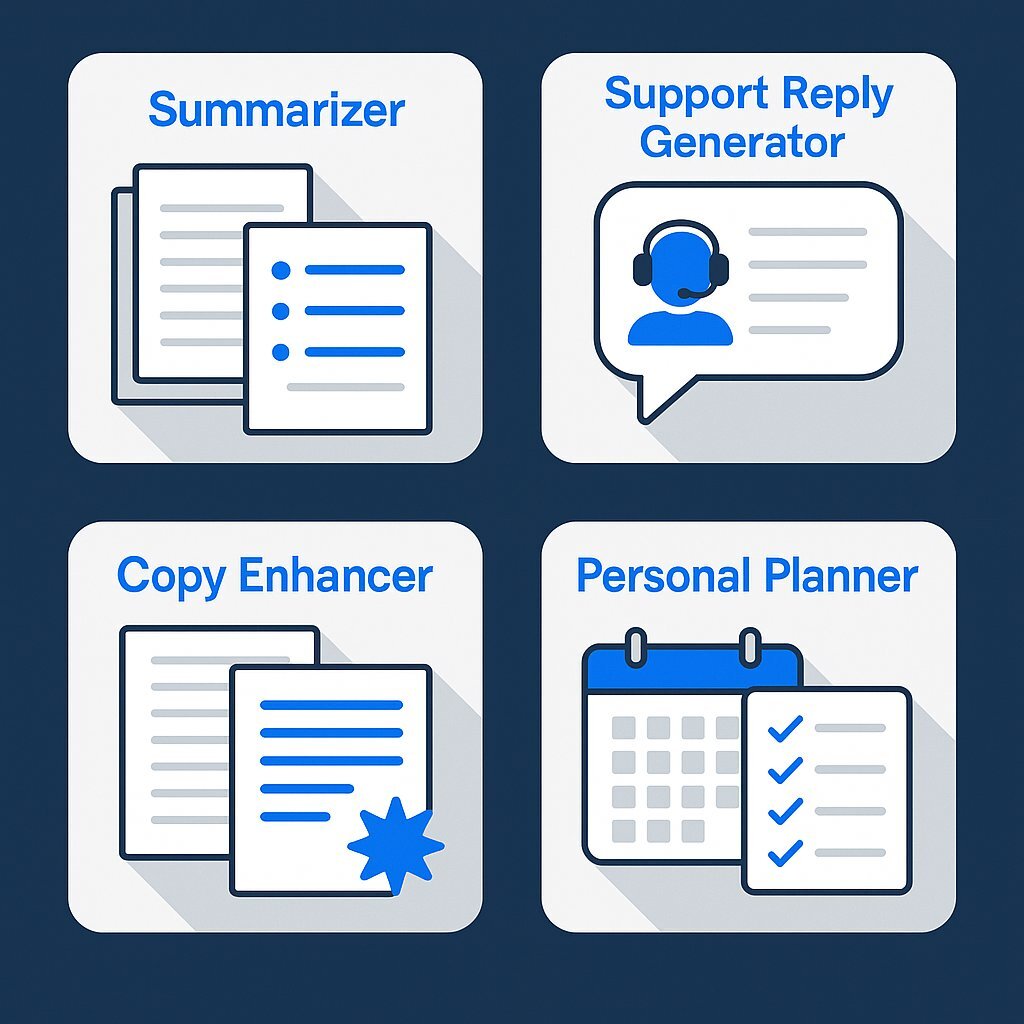
To make these use cases concrete, Opal provides a gallery of starter templates that users can “remix” or customize. These templates offer examples of the types of “mini-apps” the platform can create:
Examples of mini-apps you can build with Google Opal.
- Summarizer: Condenses long documents, articles or reports into bullet points.
- Support Reply Generator: Drafts professional and empathetic customer service emails based on support ticket details.
- Copy Enhancer: Rewrites marketing copy to match a specified brand voice, tone or style.
- Personal Planner: Generates a daily schedule or to-do list based on a set of tasks and priorities. While this is the key benefit, it also introduces one of the biggest risks for any large organization: Shadow IT. The very features that make Opal attractive—its ease of use, no price barrier and simple sharing via a web link —make it a powerful catalyst for unsanctioned and ungoverned applications.
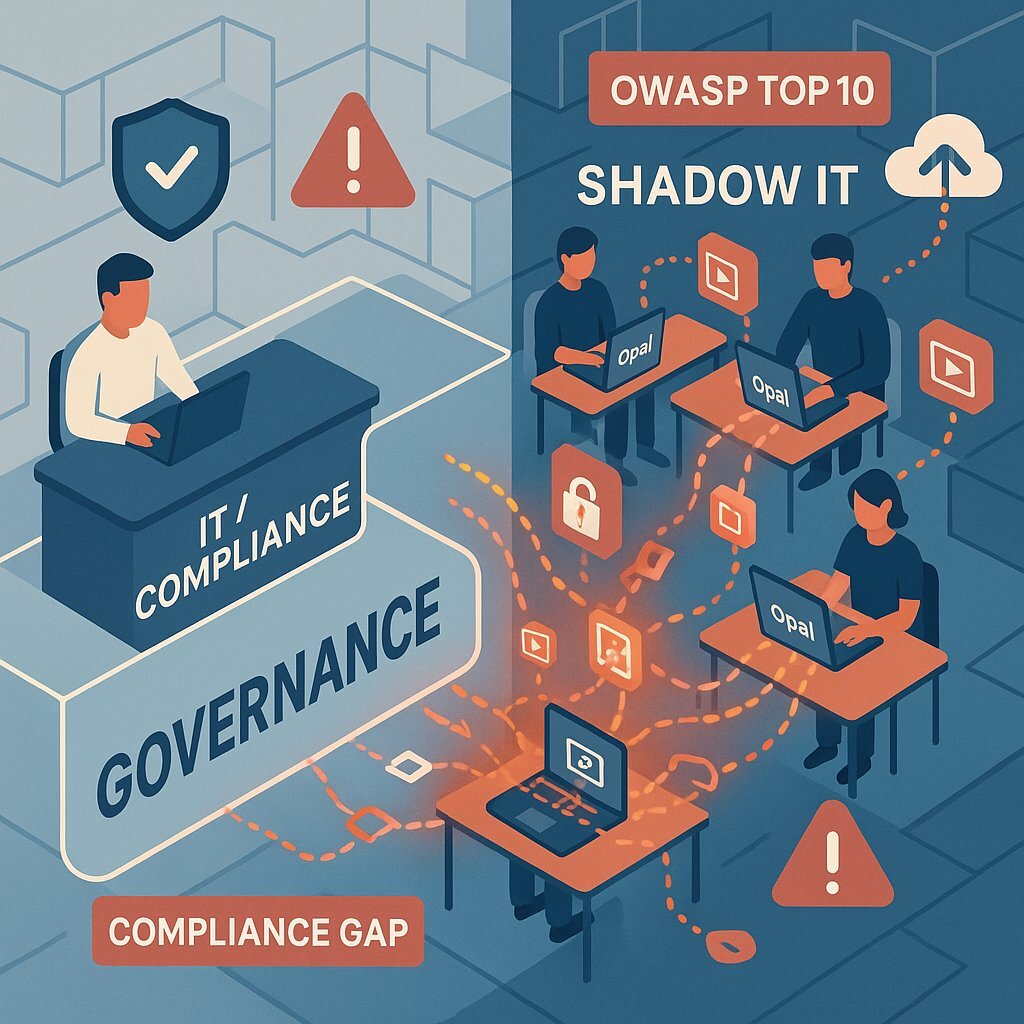
Business units can quickly build and start using apps that process, store and transmit company data outside of the IT and security departments. This is not a hypothetical risk; it’s a well-documented consequence of no-code tools in the enterprise. These “shadow” applications, built by well-meaning employees who are not security experts, can easily be misconfigured and lead to data leakage or unauthorized access. The Open Web Application Security Project (OWASP) has even published a specific “Top 10” list of security risks for Low-Code/No-Code platforms, highlighting the severity of this issue. For a deeper analysis of catastrophic no-code AI incidents and lessons learned, see Understanding Corrective Maintenance: Benefits, Challenges, and Types. So a decision to allow the use of Opal is not just a technology choice; it’s a governance decision that requires a proactive strategy to manage the inevitable creation of shadow IT.
How Does It Work? A Look Under the Hood for the Non-Developer
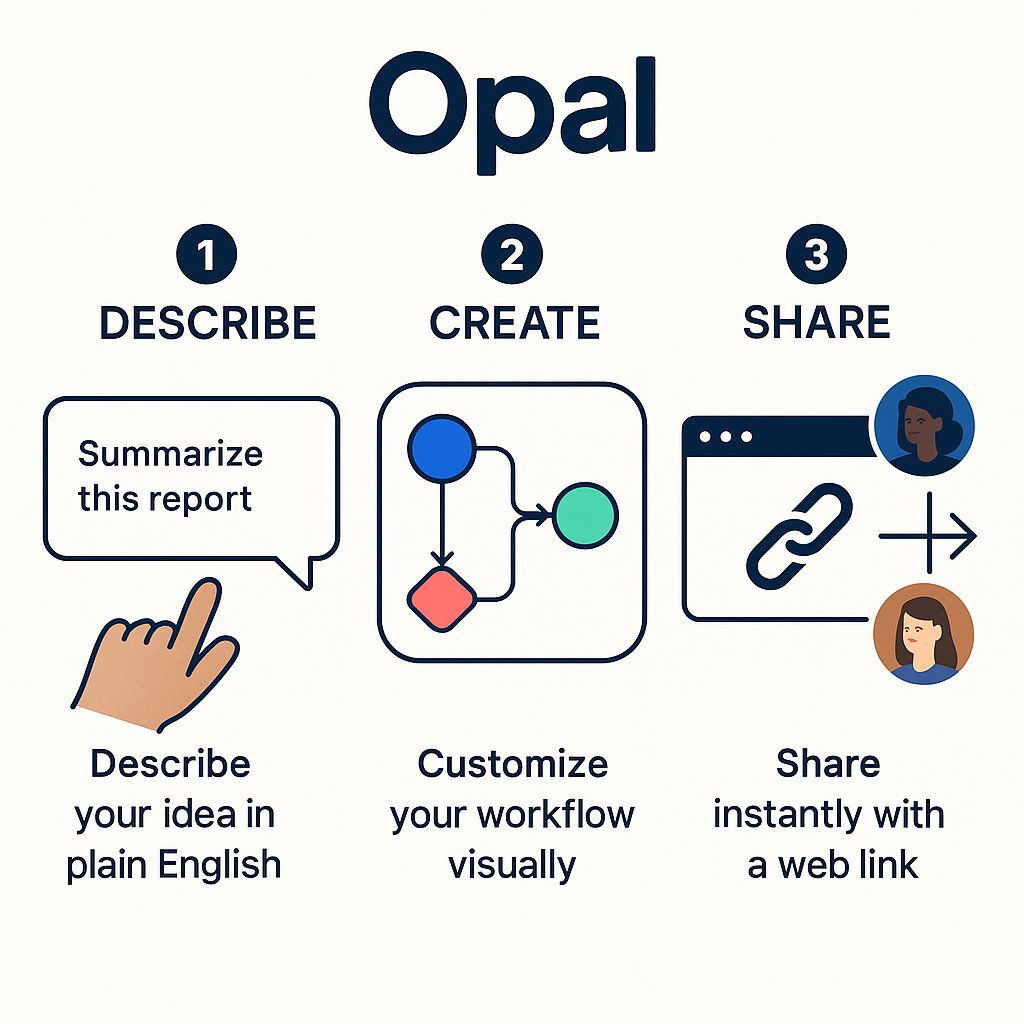
Understanding how Opal works is key to appreciating both its simplicity and its potential. The user journey is designed to be straightforward and can be broken down into three distinct steps, making the process of creating custom AI workflows or apps with Opal accessible to everyone.
In the workflow diagram, each phase is clearly outlined and a specific step is dedicated to refining or debugging your app. This ensures greater reliability and transparency so you can troubleshoot and enhance your ai mini-apps quickly.
The Three-Step Process: Describe, Create, Share
- Describe: The process starts with a simple text box. The user types a natural language prompt that describes the intended function of the application. This is the “vibe-coding” aspect, where intent is expressed conversationally. For example a user could start with the prompt, “Generate a cover letter in English based on the user’s job description”.
- Create: This is where Opal’s magic happens. It parses the user’s prompt and automatically generates a visual workflow diagram. The diagram is composed of nodes that represent the logical flow of the app: an input node for the job description, a model call node that sends the data to a Google AI model for processing and an output node that displays the generated cover letter. This visual representation is what makes complex AI processes understandable to a non-technical audience.
- Share: Once the user is happy with the app, they can publish with a single click. Opal generates a unique web link that can be shared with anyone. Other users can then access and run the mini-app using their own Google accounts, no deployment hassle. Opal can also run multiple workflows or app processes in parallel, for complex tasks.
The Power of the Visual Editor
No-code tools can create shadow IT—unseen and unmanaged risks to enterprise data.
What makes Opal more than a simple prompt-and-response tool like a standard chatbot is its interactive visual editor. This editor allows users to refine and customize the AI-generated workflow with a high degree of control, all without code. Each node in the diagram is clickable and editable, so a user can:
- Tweak Prompts: Click on an AI model node and edit the specific instructions being sent to the AI. For example, they could refine the cover letter prompt to say, “Use a friendly yet professional tone” or “Highlight skills in project management”.
- Add Logic and Tools: Using a simple toolbar, a user can add new steps to the workflow. This could be chaining multiple AI calls (e.g., first summarize, then translate), or adding conditional logic (e.g., “if the input text is longer than 500 words, then use a different summarization model”).
- Iterate and Test in Real-Time: The platform has a “Run” panel where users can input sample data and see the results instantly. This allows for rapid iteration and debugging. If the output isn’t quite right, the user can adjust a prompt and see the impact immediately. No more compile-and-deploy cycles, just iterate and refine with confidence. This visual workflow is more than just a user-friendly interface; it’s a powerful communication tool that can bridge the chronic gap between business stakeholders and technical teams. In traditional development, a business unit’s needs are often captured in static documents, which are then interpreted (and sometimes misinterpreted) by developers. This translation process is a common source of project delays and failures.
With Opal, a business user—the person with the deepest subject-matter expertise—can build a functional prototype of the workflow they envision. This interactive diagram becomes a living, testable specification. When it’s time to build a robust, scalable, enterprise-grade version of that application, the IT department doesn’t start from a Word document. They start from a functional blueprint that has already been validated by the business user. In this context, Opal’s value is not just in the simple mini-apps it creates, but in its ability to streamline the ideation and specification phase of much larger, more critical development projects, ultimately saving time and reducing costly rework. For organizations considering no-code platforms or custom software development, it’s essential to weigh speed, control and long-term strategy.
How Much Will Google Opal Cost My Business?
The biggest question for any executive evaluating a new technology is cost. For Google Opal, the answer is simple and complex.
Today: Free (For Now)
As a product in public beta, Google Opal is free to use. This pricing strategy—or lack thereof—is intentional. By removing the cost barrier, Google can get widespread adoption, which in turn gives them a massive dataset on user behavior and popular use cases. That’s invaluable for refining the product and planning the future.
Tomorrow: A Forecast of the Pricing Model
Business leaders should assume this free period is temporary. Running the infrastructure behind a platform like Opal, especially the powerful AI models that do the heavy lifting, is expensive for Google. Monetization is not a question of if, but when. Google hasn’t announced pricing for Opal, but we can make an educated forecast by looking at the pricing models of its other enterprise AI services, particularly Generative AI App Builder and Vertex AI Search. Those platforms show a clear trend away from simple, predictable subscriptions and towards complex, consumption-based models. If you want an executive-level breakdown of AI platform pricing, TCO and hidden costs, be sure to read A CFO’s Playbook: Pragmatic AI Investment for Real-World ROI.
Google Opal translates natural language into visual, editable workflows.
Based on this precedent, the future cost of using applications built on Opal will likely be tied to a combination of the following:
- Queries / API Calls: A metered charge for each time an application is run or a user submits input. For example, Google’s enterprise search tools charge between $1.50 and $4.00 per 1,000 queries.
- AI Model Usage (Token Consumption): A granular cost based on the amount of text processed by the underlying Gemini models. This is typically measured in “tokens” (roughly corresponding to words or parts of words) for both the input prompt and the generated output.
- Data Storage and Indexing: A recurring monthly fee based on the amount of data, in gigabytes, that your applications store or index for their operations. Google’s current rate for this is around $5.00 per GiB per month.
- Advanced Features and Capabilities: Premium pricing tiers for access to more powerful or specialized AI models, or for using advanced features like grounding outputs in Google Search results, which can cost up to $35.00 per 1,000 requests.
The key takeaway for a business leader is the risk of unpredictable, consumption-based costs. A simple per-user, per-month SaaS subscription, like Microsoft’s Power Apps Premium at $20 per user/month, is easy to budget for. In contrast, a consumption-based model means costs scale directly with usage. An internal productivity app that goes viral within your organization could go from being a negligible expense to a significant and unexpected line item on your cloud bill. This requires careful monitoring, usage quotas and a more dynamic approach to financial planning. For practical ways to forecast and optimize application costs, check out Executive Guide: Transforming B2B Software Development with AI. Additionally, this pricing strategy is more than just a cost-recovery mechanism; it’s a powerful lever for driving ecosystem lock-in. By breaking down the cost into granular micro-transactions tied to a web of underlying Google Cloud services (Gemini models, Vertex AI Search, Cloud Storage), Google makes any application built on Opal deeply intertwined with its platform. This complexity makes calculating the Total Cost of Ownership (TCO) difficult and migrating the application to another provider or an in-house solution a monumental task. You wouldn’t be moving a single app; you’d be untangling and replacing a complex mesh of integrated, metered services. So once Opal is monetized, a commitment to it should be seen as a strategic commitment to the broader Google Cloud ecosystem, complete with the high switching costs that comes with it.
The Competitive Landscape: How Does Opal Compare?
Google Opal is not alone in the no-code and low-code AI development space. The competition is fierce with tech giants, established market leaders and agile startups all vying to be the platform of choice for the next generation of software creation. Understanding where Opal fits in this competitive landscape is crucial for making an informed decision.
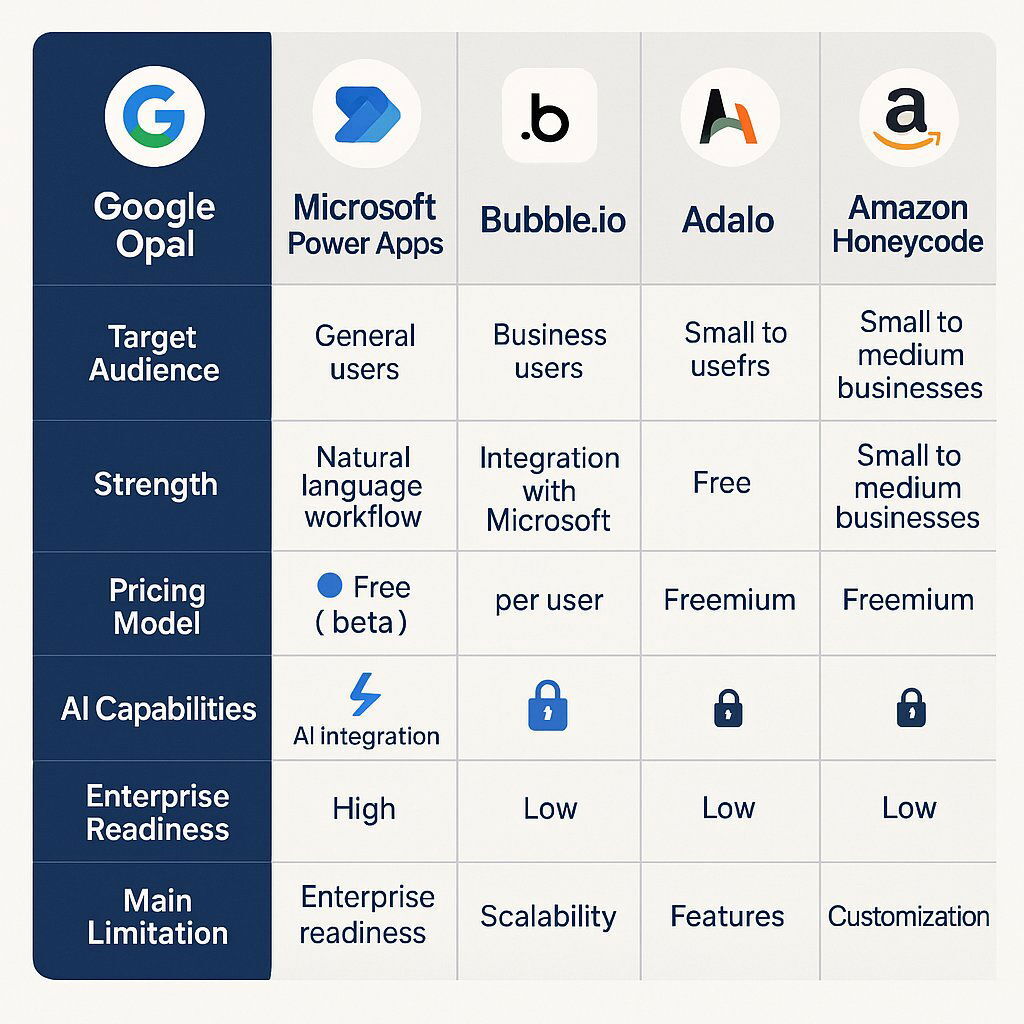
Here is a high-level comparison of Google Opal against key competitors, each representing a different archetype in the market. This is designed to give a time-crunched executive a quick overview of the main alternatives and their positioning. Note that Opal lets users build innovative, no-code AI-powered applications—commonly referred to as opal apps—so it’s focused on accessibility and creativity.
| Feature | Google Opal | Microsoft Power Apps | Bubble.io | Adalo | Amazon Kiro |
|---|---|---|---|---|---|
| Target Audience | Non-technical business users, hobbyists, students | Citizen developers to Pro developers; Enterprise-wide | Entrepreneurs, startups, developers building complex web apps | Entrepreneurs, small businesses focused on mobile & web apps | Enterprise developers |
| Core Strength | Extreme ease-of-use, rapid prototyping with natural language, visual workflows | Deep integration with Microsoft 365, Azure, and Dynamics; strong governance | Unmatched flexibility and customization for web apps; powerful backend logic | Simplicity for building and publishing native mobile apps to app stores | Specification-driven development; focus on documentation and maintainability |
| Pricing Model | Free (in beta); likely future consumption-based model | Per-user/per-month subscription; add-ons for capacity/AI | Usage-based (Workload Units); tiered subscriptions | Per-published-app subscription; tiered by features and usage | Not publicly available; likely tied to AWS consumption |
| AI Capabilities | Core feature: Generative AI (Gemini) for app creation, prompt chaining | Integrated Copilot & AI Builder for app generation, data analysis, automation | AI App Generator; integrations with external AI services like OpenAI via API | Limited built-in AI; relies on integrations like Zapier to connect to AI services | Agentic AI for generating project plans, technical docs, and code |
| Enterprise Readiness | Low: Experimental, no governance, unknown scalability/security posture | High: Strong governance, security, compliance, and scalability within Azure | Medium: Scalable but requires expertise; security is developer's responsibility | Low-Medium: Good for MVPs, but limited backend control and scalability for enterprise | High: Explicitly designed for enterprise-grade reliability and maintainable software |
| Key Limitation | Not production-ready; high risk; potential for unpredictable costs | Can be complex and costly; most effective within the Microsoft ecosystem | Steep learning curve; primarily for web apps, not native mobile | Limited backend customization; pricing per app can be costly for multiple projects | Less focus on rapid "vibe-coding"; more structured and potentially slower to start |
Recent updates have focused on opal’s core performance, making app creation faster and more responsive. This means more complex workflows and a better overall experience when building opal apps.
Competition Narrative
Opal vs. Microsoft Power Apps: The Ecosystem Showdown This is the headline battle. It’s Google’s agile, user-centric experiment vs Microsoft’s enterprise-grade behemoth. Power Apps is the clear choice for organizations already deeply invested in the Microsoft ecosystem (Microsoft 365, Azure, Dynamics 365). It has governance, security controls, and integration with the tools you already use. But power comes with complexity and potentially high total cost of ownership when all the licenses and add-ons are factored in. Opal is much simpler and faster to get a basic idea off the ground but lacks every single one of the enterprise-readiness features that make Power Apps a viable (if complex) corporate tool. Still, users have used Opal’s AI-powered mini-app builder to create highly creative opal apps showing the platform’s potential despite its limitations.
Opal vs. Bubble.io & Adalo: The No-Code Heavyweights
This comparison highlights Opal’s immaturity. Bubble is the market leader for building complex, custom web applications with powerful backend logic and database capabilities. It has unmatched flexibility but a notorious steep learning curve. Adalo has carved out a niche by being great at one thing: building and publishing true native mobile apps for the Apple App Store and Google Play Store—a major weakness for both Bubble and the web-based Opal. Opal is easier to start with than either of these platforms but is less powerful, less proven and less capable of building anything beyond simple prototypes. If you’re comparing low-code and no-code options along this spectrum, Harnessing the Power of Low-Code & Custom Development for Business Innovation 2025 is a practical rundown.
Opal vs. Amazon Kiro: A Philosophy Fight
This is a fascinating look at two different approaches to the same “vibe-coding” trend. Google’s Opal prioritizes speed and conversational creativity to get a functional app in a user’s hands as fast as possible. Amazon’s Kiro takes the opposite approach. It’s designed to combat the chaos of unmanaged AI development by enforcing structure. Kiro is a “specification-driven” agent that first generates project plans and technical documentation before you write code with the goal of turning prototypes into maintainable enterprise software. It’s Amazon’s answer to the scalability and governance problems that platforms like Opal introduce.
Is No-Code AI Ready for the Enterprise?
The promise of no-code AI is undeniable. For decades, creating software has been behind the high walls of technical knowledge. Platforms like Opal propose to tear down those walls, democratizing innovation and offering a vision of a future where development is faster, cheaper and more accessible. By empowering business users to solve their own problems they can speed up workflows and free up professional developers to focus on the most complex, high-value projects. One thing is clear about Opal, its interface makes complex workflows simple and transparent for users.
But for a large enterprise, this promise is shadowed by immediate and profound risks. Before embracing this new paradigm, executives must weigh innovation against a structured framework of risks. If you’re looking for a C-suite playbook for weighing risk vs ROI as you evaluate production AI tools, refer to Executive Guide: Why DevSecOps Is Now Essential for Security and Growth.
A Risk Framework
1. Security & Compliance: The Biggest Risk This is the number one barrier to enterprise adoption. No-code platforms by their nature put powerful development tools in the hands of users who are not security experts. This creates a perfect storm for vulnerabilities. The OWASP Top 10 for Low-Code/No-Code Security Risks is an authoritative list of these threats. In business terms these risks are:
- Insecure Configurations: Default settings are often not secure and citizen developers can easily misconfigure applications leaving administrative interfaces open or making private files publicly accessible. Misconfigured Bubble apps for example have been found to leak thousands of records of personally identifiable information.
- Data Leakage: Applications can be built in a way that they send more data than necessary to an API or other services, exposing sensitive information.
- Authorization Misuse: Without careful design it’s easy to create applications that don’t properly enforce the principle of least privilege, giving regular users access to administrative functions or data they shouldn’t see.
- Vulnerable Components: No-code platforms rely on a web of pre-built components and third-party connectors. A vulnerability in any one of these components can compromise the entire application.
- Shadow IT and Compliance Gaps: The ungoverned creation of applications by business units creates a massive blind spot for compliance. An app built by the marketing team to handle customer contest entries could violate GDPR, or an HR tool could mishandle data in a way that violates SOX or HIPAA regulations exposing the organization to significant legal and financial penalties. For a deeper look at compliance risk and cloud-era best practices see Successful Software Project Management Tips.
As Opal is still in experimental phase, early adopters have played a crucial role by testing the platform and providing feedback that has shaped its development and improvements.
2. Scalability & Performance No-code platforms are optimized for simplicity and ease of use not for high-performance, large-scale operations. They struggle with large datasets, high transaction volumes or millions of simultaneous users. They are great for internal tools or departmental apps but not for a mission-critical, customer-facing system like Netflix’s streaming service or Uber’s real-time logistics engine, both of which rely on custom code.
3. Governance & Control Enterprise software development has governance for a reason: to ensure quality, maintainability and stability. Most no-code platforms lack the fundamental governance features that IT departments require: robust version control, automated testing frameworks, granular access controls for developers and comprehensive audit logs. Without these controls an organization can quickly find itself with a sprawling, undocumented and unmanageable “spaghetti mess” of applications that are impossible to maintain or update reliably.
4. Vendor Lock-In & Lack of Portability This is a strategic risk that is often overlooked in the initial excitement of rapid development. Applications built on a proprietary no-code platform are by definition not portable. The logic, data structures and workflows are tied to the vendor’s ecosystem. An organization can’t download the source code and host the application elsewhere. This gives the vendor a lot of leverage. If they increase prices, are acquired by a competitor or decide to sunset the product the business may have to rebuild the application from scratch on a new platform. 5. Integration Challenges While platforms boast libraries of “connectors” to popular SaaS tools, integrating with the complex, custom and often legacy systems that form the backbone of a large enterprise (ERPs, mainframes or proprietary internal APIs) is a big challenge. This limits no-code applications to the periphery of business operations, preventing them from being used for core processes that require deep integration with systems of record. For a strategic breakdown of integration pain points especially in complex cloud-native environments see .NET vs. Node.js: The Ultimate Strategic Backend Comparison for Enterprises.
6. Hidden Costs & Technical Debt The initial appeal of a “free” or low-cost platform is often deceptive. The true total cost of ownership can escalate rapidly through consumption-based overages, fees for premium features and charges for increased capacity. Furthermore applications built quickly by non-experts often accumulate significant “technical debt” – poor design choices and shortcuts that make the application difficult and expensive to maintain or modify in the future. Eventually the cost of working around the platform’s limitations can exceed the cost of having built the application correctly with professional tools in the first place.
No-code platforms don’t eliminate the need for technical and design expertise; it changes its role. The critical skill for the modern IT department is shifting from writing every line of code to providing governance, architecture and quality control. The new essential function is “AI Management” or “No-Code Governance”. Developers become supervisors, ensuring that the applications being rapidly generated by the business are secure, scalable, efficient and well-designed. The recent, highly publicized incident where Replit’s AI coding agent caused a major database failure is a stark reminder of the dangers of over-relying on automated tools without rigorous human oversight. For an executive view of non-determinism, reliability and real-world production incidents in AI see The Replit AI Disaster: A Wake-Up Call for Every Executive on AI in Production. The paradox of this new era is that as AI makes development appear easier the need for people who possess a deep understanding of software engineering principles becomes more critical than ever to manage the resulting risk and complexity.
AI in Google Opal: What’s Different
Google Opal stands out in the no-code landscape by putting advanced AI models at the heart of the app builder experience. Built by Google Labs, Opal lets users create highly creative AI-powered mini apps with nothing more than natural language instructions. Anyone – from business analysts to marketers to content creators – can describe what they want their app to do in plain English and Opal’s AI models will generate a functional, visual workflow in response.
What really sets Opal apart is the ability to process user input across multiple steps, allowing for complex workflows that go far beyond simple prompt-and-response tools. Whether you want to automate content creation, streamline business analysis or build fun tools for personal productivity, Opal’s visual editor lets you design, edit and customize every step of your mini app – without writing a single line of code. The visual workflow editor provides immediate context for each step, so you can see how data flows and how each prompt or action is processed.
Opal’s core performance has seen significant improvements with generating and running apps now taking up to 5 seconds down to a much faster and more responsive experience. With an enhanced debugging program, much of the guesswork that slows down no-code development is eliminated. You can test your apps in real time, get instant feedback and quickly identify and fix issues – all within the same visual interface.
Seamless integration with Google accounts means you can create, share and collaborate on mini apps with other users globally, leveraging the Google ecosystem. This accessibility combined with Opal being experimental and always updating means creators – whether in South Korea, Costa Rica, El Salvador or anywhere else – are always working with the latest AI-powered capabilities.
For organizations and individuals invested in the Google suite of tools, Opal offers a way to prototype and deploy custom AI apps using natural language. It’s perfect for those who want to build simple yet powerful apps from scratch without needing to code. From generating custom content to automating multi-step business processes, Opal’s AI-driven approach opens up a new era of app development – where creativity and problem solving are limited only by your imagination, not your ability to code. In summary, the role of AI in Google Opal is to democratize app creation by turning natural language prompts into sophisticated AI-powered mini apps. With its improved core performance, robust visual editor and seamless integration with Google tools, Opal is making app creation, testing and sharing faster, easier and more accessible than ever before.
Conclusion: Baytech’s Recommendation: A Strategic Framework for No-Code AI
The rise of no-code AI tools like Google Opal presents an executive dilemma. On one hand they offer unprecedented speed, democratized innovation and productivity. As Opal rolls out to more countries, more creators are getting access to the platform, resulting in a rapidly growing user base and a broader community of app creators. On the other hand they introduce significant risks to security, governance and long term strategic flexibility. A simple yes or no answer to their adoption is the wrong approach. The right approach is a risk managed strategy.
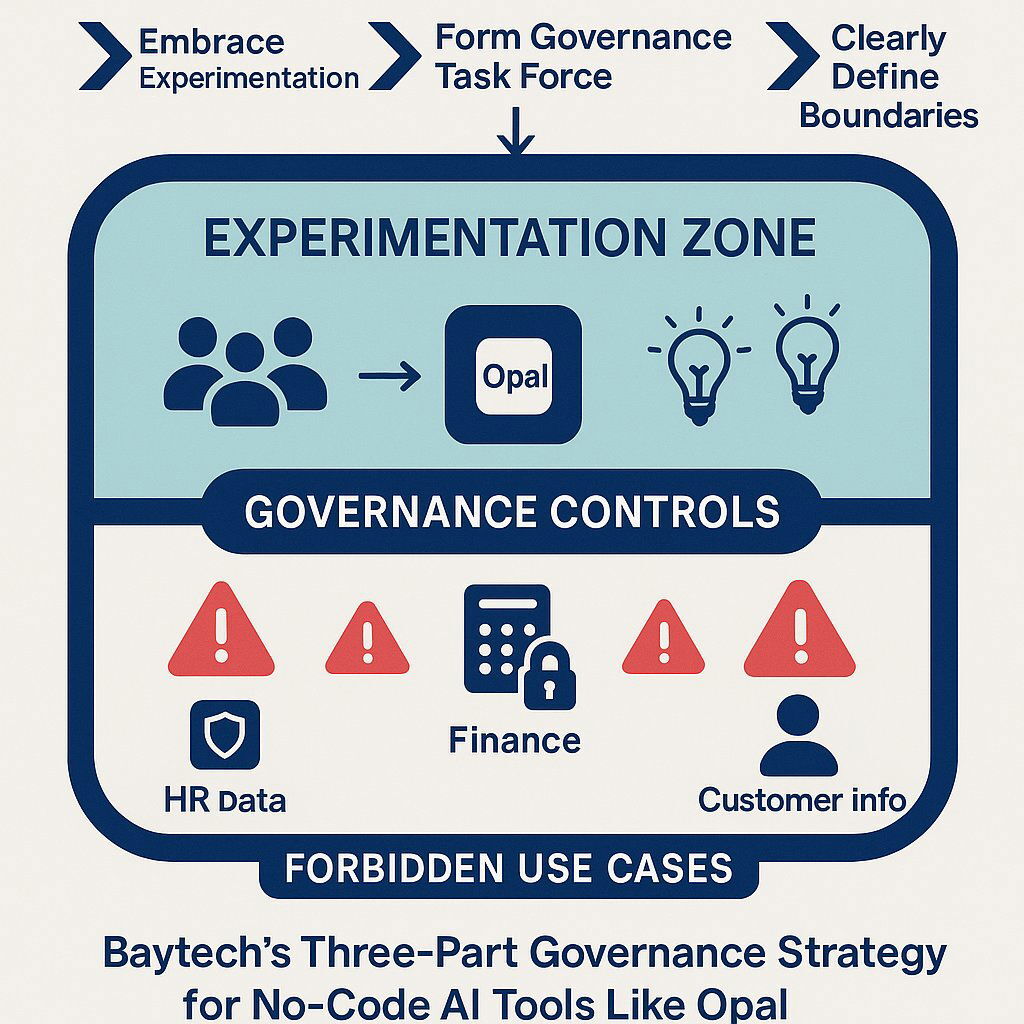
Baytech Consulting recommends the following three part framework for any organization looking to navigate this new landscape:
- Embrace the Sandbox, But Control Its Borders. Don’t ban these tools. Outright prohibition will only drive them further underground. Instead create a formal, controlled “sandbox” environment for experimentation. Encourage departments like marketing, sales and HR to use tools like Opal for their intended purpose – building non-critical, internal facing prototypes and small scale productivity applications. This will allow the organization to capture the benefits of rapid innovation while containing the associated risks.
- Form a Governance Task Force – Now. Before wider adoption is considered, a cross-functional governance team must be formed comprising leaders from IT, Cybersecurity, Legal/Compliance and key business units. The first task of this team should be to develop a clear and enforceable governance framework for all no-code and low-code development. This framework must define policies for data classification and access, security standards for all new applications, a formal review and approval process and a plan for managing the entire application lifecycle from creation to decommissioning.
- Draw a Hard, Bright Line in the Sand. The governance framework must clearly define what is acceptable for a no-code platform versus what requires professional-grade development. This is not a gray area. Any application that will handle sensitive customer data (PII, PHI), financial information (PCI), intellectual property or is in any way considered mission-critical to business operations MUST be built using a robust, secure and scalable enterprise-grade platform. This may be a mature enterprise low-code platform like Microsoft Power Apps or Salesforce Platform or for the most critical systems, custom software development with Agile Methodology. No-code tools like the experimental Google Opal should be explicitly forbidden for these use cases.
The future of enterprise development will not be a binary choice between no-code and custom code. It will be a blended strategy that uses the right tool for the right job. The challenge and opportunity for today’s leaders is to build the framework that allows for this blended approach to thrive, rapid innovation at the edges while protecting the critical core of the business. Navigating this complexity requires a clear-eyed strategic partner. Baytech Consulting is here to help you build that framework and turn the no-code revolution into a safe and sustainable competitive advantage.
Further Reading
- “Introducing Opal: describe, create, and share your AI mini-apps” – Google Developers Blog
- “Google joins viral vibe-coding craze with new AI app builder Opal — here is how it works” – India Today Tech
- “Google Labs Introduces Opal, a Visual Platform for Creating AI Mini-Apps” – InfoQ
- “Google debuts no-code Opal tool for building ‘AI mini-apps’” – SiliconANGLE
- “Google Labs introduces Opal for developing AI mini apps” – InfoWorld
About Baytech
At Baytech Consulting, we specialize in guiding businesses through this process, helping you build scalable, efficient, and high-performing software that evolves with your needs. Our MVP first approach helps our clients minimize upfront costs and maximize ROI. Ready to take the next step in your software development journey? Contact us today to learn how we can help you achieve your goals with a phased development approach.
About the Author

Bryan Reynolds is an accomplished technology executive with more than 25 years of experience leading innovation in the software industry. As the CEO and founder of Baytech Consulting, he has built a reputation for delivering custom software solutions that help businesses streamline operations, enhance customer experiences, and drive growth.
Bryan’s expertise spans custom software development, cloud infrastructure, artificial intelligence, and strategic business consulting, making him a trusted advisor and thought leader across a wide range of industries.